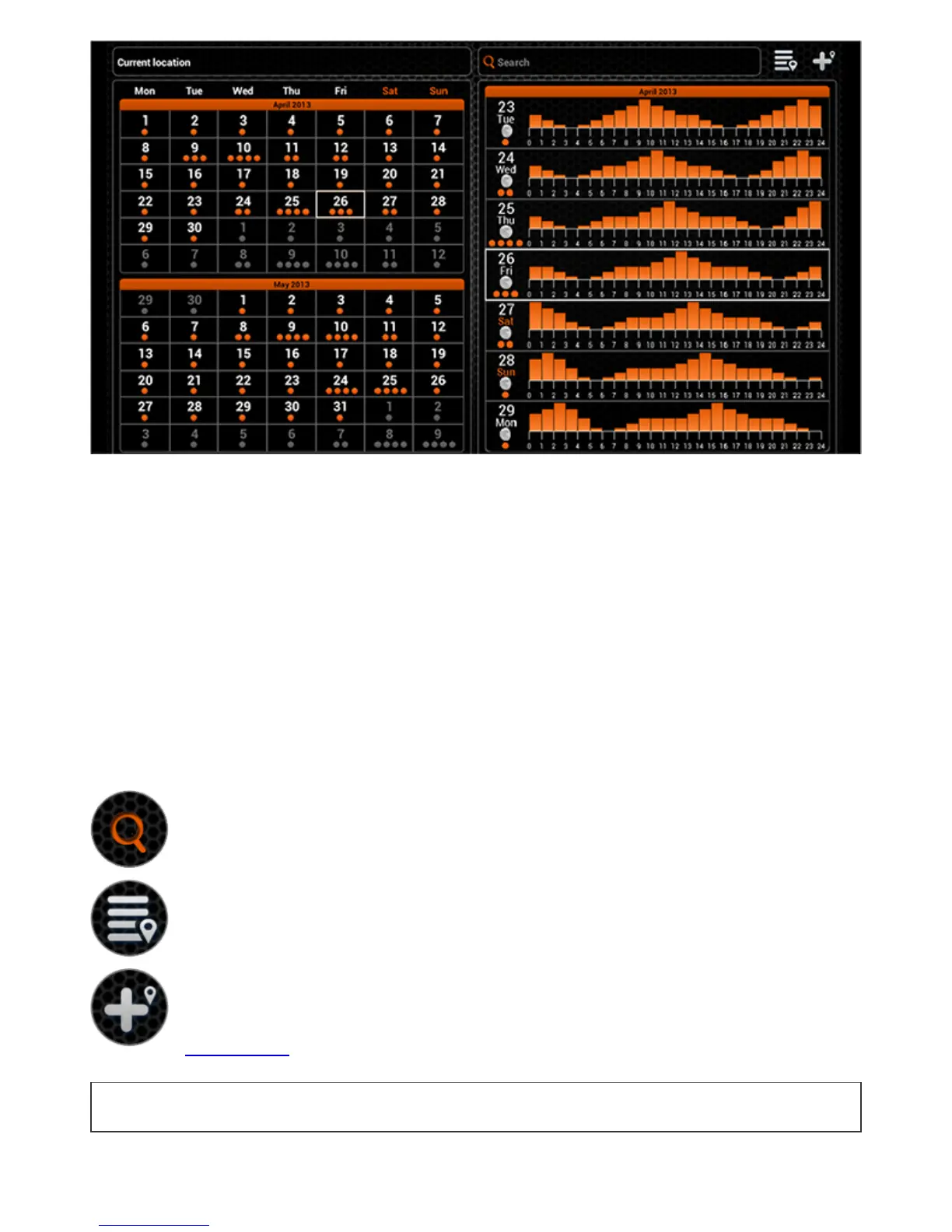
TheCalendarprovidesyouwithinformationaboutfishactivitylevelsandlunarphasesfor
achosenfishinglocation.Thefishactivitylevelforeachdayofthemonthispresentedby
theorangecircles.ByclickingonaparticulardayintheCalendaryoucanseethehourly
fishactivitylevels.Thehigherthefishingactivitylevelisthehigherarethechancesofa
successfulfishing.
OnaGPSenabledmobiledevicetheCalendarwillopenshowinginformationforyour
currentposition.Youcancheckthefishactivitylevelsforaparticularlocationbyusingthe
searchfieldorchoosingitfromyourpreviouslyaddedfishinglocationslist.Youcanalso
addthelocationthatyouarecurrentlyviewingtothislist.
LocationsaddedthroughtheCalendarwillalsoappearintheMapandwillbeclassifiedas
fishinglocations.
Locationsearch
Locationslist
Addlocation
BacktoTOP


 To Next Page