(1) Check the email address spelling uppercase and lowercase correct or not. Ensure it without blank
letters.
(2) Check the spam folder.
(3) Please contact our support team if the code doesn’t be obtained within 5 minutes. E-mail address:
support@deeprio.com
2.3.Pairing
2.3.1. How to pair for the first time
The watch need to pair the smartphone with BLE and BT. So two kinds of Bluetooth need to be
connected.
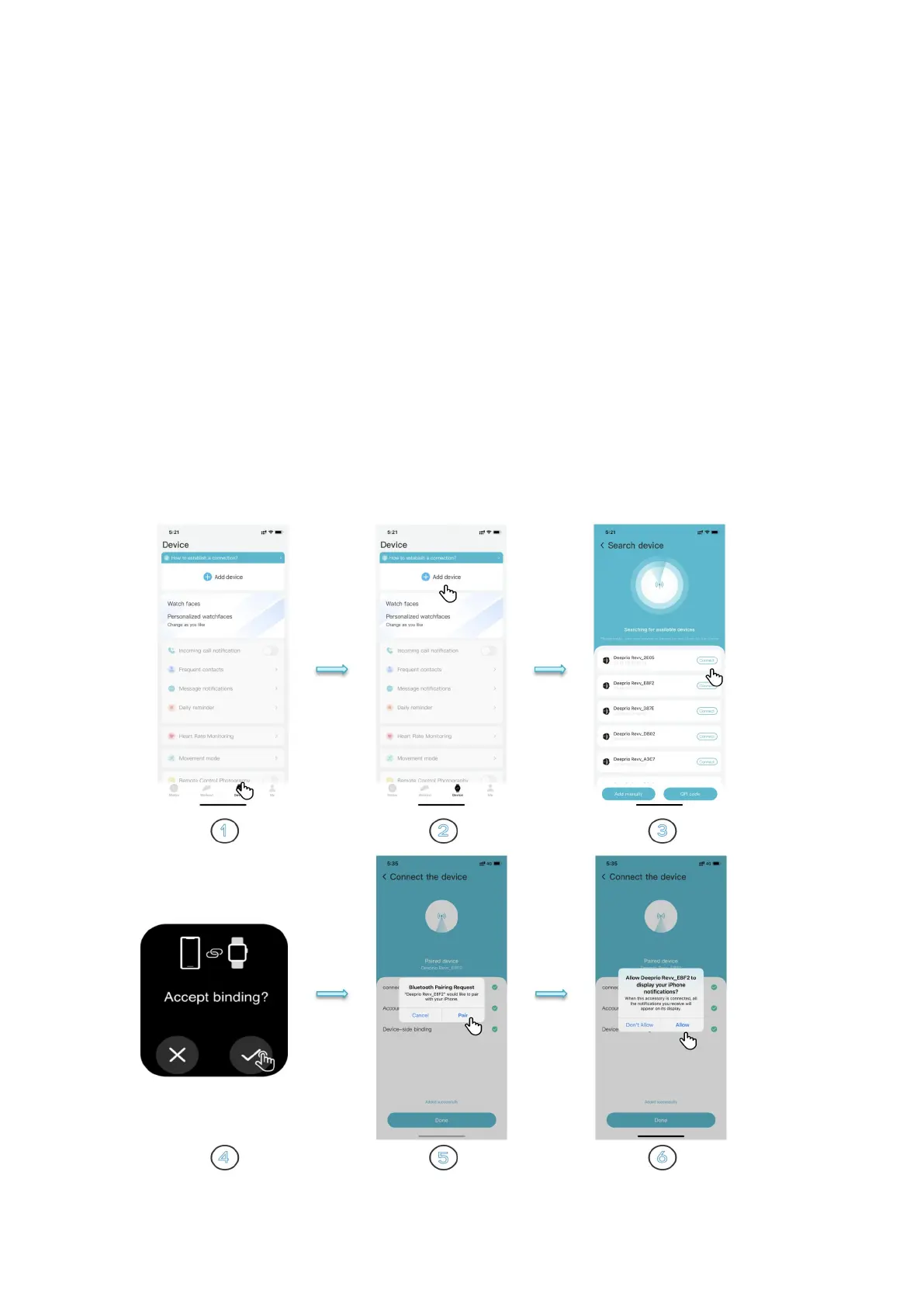
①Steps to pair with BLE:
There are 3 ways to pair the watch, please choose ANY one of them to pair it.
Open Deeprio App > Device > Add device >
(1) Waiting for the searching device result > Connect the device > Select "√" on the watch.
(2) Add manually > Select Deeprio Revv > Connect your device > Select "√ "on the watch.
(3) Scan it > Scan the QR code on the watch > Select "√ "on the watch


 To Next Page