5
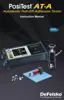
Pump Handle
Display
USB Data Transfer /Power Port
Actuator Handle
Quick Coupling
Actuator
Assembly
Hose
Pump
Quick Guide
(1) Open pressure relief valve completely (turn counter clockwise)
(2) Connect the actuator to the dolly
(3) Close the pressure relief valve completely (turn clockwise)
(4) Zero - Press the button
(5) Pump pressure into the system until the dolly pulls
The PosiTest AT-M powers-up and displays dashes when the
button is pressed. To preserve battery life, the instrument
powers-down after 5 minutes of no activity.
1. Ensure the pressure relief
valve is completely open.
(turn counter clockwise)
OPEN
2. Push the actuator handle completely down into the actuator
assembly. Place the actuator over the dolly head and attach the
quick coupling to the dolly by reaching through the holes in the
actuator and lifting the coupling. Release the quick coupling when
the dolly head is completely engaged.
PosiTest AT-M Manual



 To Next Page
 Loading...