Need Help? Visit DefenderCameras.com/support
8
Step 2: Position and Install Your Camera
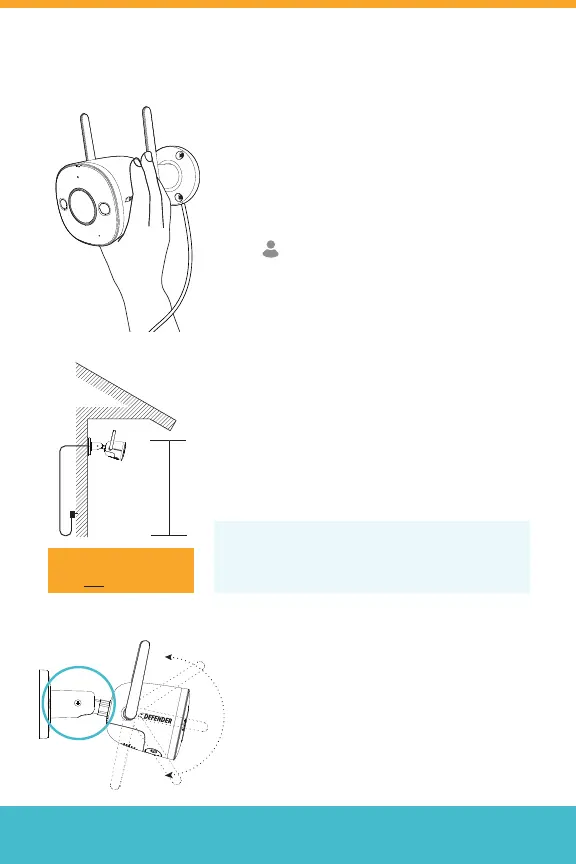
Important: Before mounting your camera,
use the app to test your Wi-Fi strength and
video feed. Plug the camera in the area you’ll
be monitoring and view your footage to
ensure you have a clear, uninterrupted view.
To check your network signal strength,
tap > Tool > Wi-Fi Detection Tool >
Wi-Fi Detection
Note: Cement walls, exterior nishes, and
thick insulation can signicantly aect Wi-Fi
signal strength.
2.5 m
(8 ft)
Using the recommended tools, install your
camera in a preferred place, at a height
where you can clearly see faces. Make sure
there is a nearby power outlet.
Using a Phillips #2 screwdriver, loosen the
screw and adjust the position of your camera
to ensure you get the best video view. Tighten
the screw when nished. You can also adjust
the antennas if required.
Tip: Your Guard Pro Camera comes with a 25ft.
extension cable, giving you 35ft. to mount your
camera from the power outlet.
IMPORTANT:
The Camera Power Supply is
NOT waterproof.



 To Next Page