6
Operation
1
Adjusting the Motion Sensor
CAUTION: Keep the motion sensor at least 1 in. (25 mm)
away from standard PAR38 bulbs.
CAUTION: Keep the motion sensor at least 2 in. (50 mm)
away from halogen bulbs.
CAUTION: To avoid water damage and risk of electrical
shock, the motion sensor controls must be facing the
ground when installation is complete.
Ƒ Turn the power on at the circuit breaker or fuse
and turn on the wall switch.
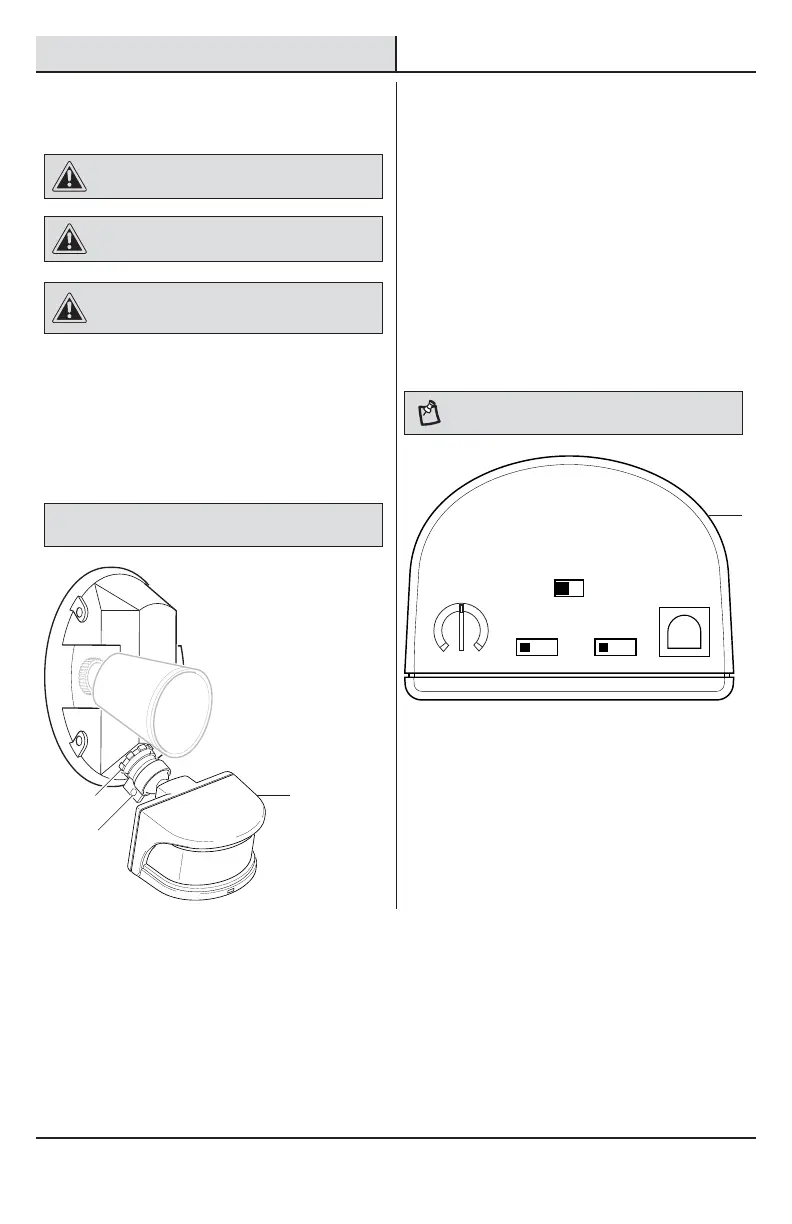
Ƒ Loosen the lock nut (3) and screw (4) to adjust
the motion sensor (A) for the desired coverage.
Ƒ Rotate the motion sensor (A) so the controls
face toward the ground.
Ƒ Tighten the lock nut (3) and screw (4).
NOTICE: All clearances must be maintained. See Safety Information
on page 2.
2
Setting the Sensor for Testing
When the “ON-TIME” switch is set to the “TEST”
position, the light xture will operate during the day
or night. The light will stay on for 5 seconds after all
motion is stopped.
Ƒ Set the “ON-TIME” switch to the “TEST”
position.
Ƒ Set the “DUALBRITE” switch to the “OFF”
position.
Ƒ Turn the “RANGE” dial to the “MIN” position.
Ƒ Aim the motion sensor (A) in the general
direction of the area to be covered.
NOTE: The motion sensor will need to completely warm
up (90 seconds) before beginning the setup process.
LAMP MODE
NORMAL SOFT FLASH
ON-TIME DUAL BRITE™
TEST 1 5 20
MINUTES
OFF 3 6 DUSK TO
HOUR DAWN
MAXMIN
RANGE
A
A
3
4



 To Next Page