7 HOMEDEPOT.COM
Please contact 1-866-308-3976 for further assistance.
Installation (continued)
4
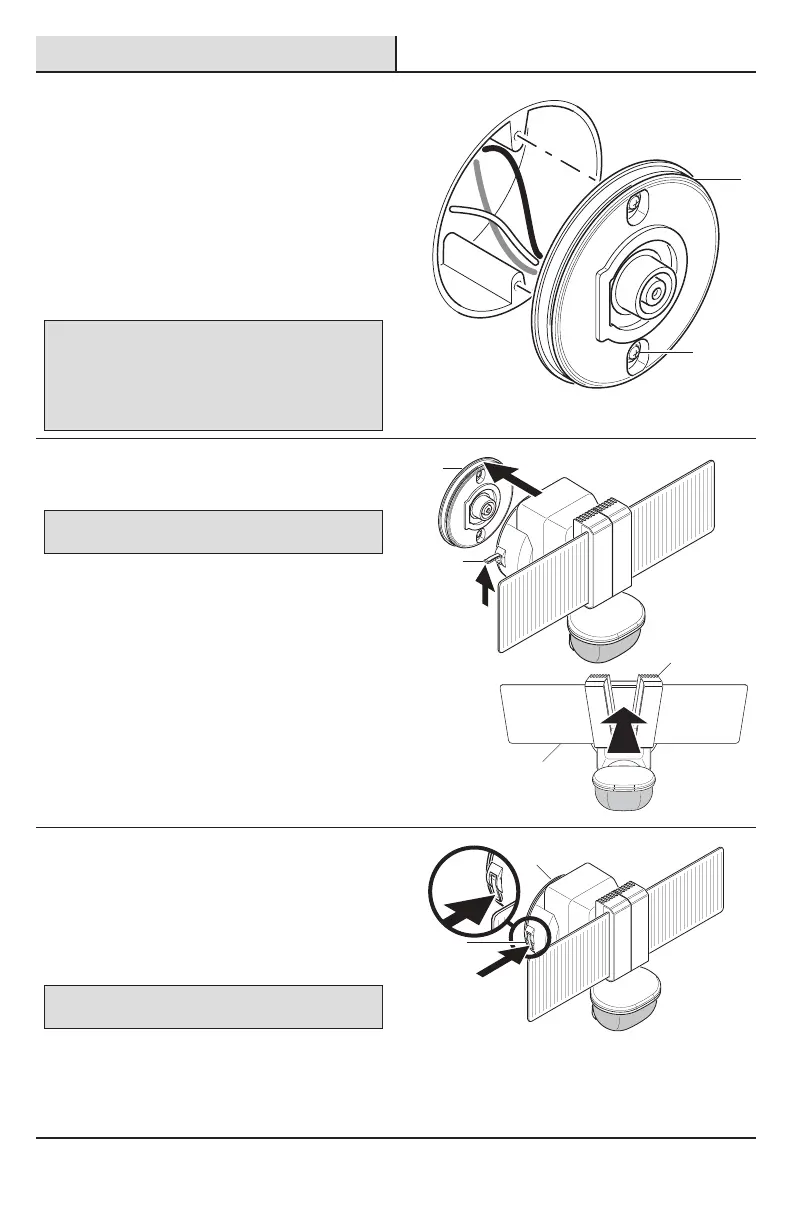
Installing the mounting plate
□ Place the mounting plate (D) against the
junction box.
□ Tighten the two mounting screws (BB) securely
to the junction box. If necessary, use the
screws that were removed from the existing
light xture. Do not overtighten.
□ Firmly pull on the mounting plate(D) to ensure
it is securely attached to the junction box.
IMPORTANT: Use the larger mounting plate screws if the pre-
installed screws are too small for the junction box holes.
• Unscrew the mounting plate screws from the mounting plate
using a screwdriver.
• Remove the rubber gaskets from the mounting plate screws.
• Place the rubber gaskets on the larger mounting plate screws and
screw the screws into the mounting plate using a screwdriver.
5
Mounting the light fixture
NOTICE: The light xture must securely snap onto the mounting
plate completely for the locking handle to close.
During the installation, DO NOT press against the
light panels (A) or the heat sinks (E). Move the light
panels(A) apart and apply pressure directly to the light
xture housing.
□ Pull up on the locking handle (4) to unlock.
□ Align the back of the light xture with the
mounting plate (D).
□ Firmly press the center of the light xture
housing to securely snap the light xture onto
the mounting plate (D). The light xture must be
fully seated onto the mounting plate (D) all the
way around.
6
Locking the light fixture
□ Rotate the light xture to the desired position.
□ Press down on the locking handle (4)
completely to secure the light xture to the
mounting plate (D).
NOTICE: Gently pull on the light xture to ensure it is securely
connected to the mounting plate.
D
D
E
A
4
4
D
BB





 To Next Page