Page 13
First cleaning of the appliance
Surfaces might get damaged by some
detergents or cleaning materials. Do not
use aggressive detergents, cleaning
powders/creams or any sharp objects
during cleaning. Do not use harsh
abrasive cleaners or sharp metal
scrapers to clean the oven door glass
since they can scratch the surface,
which may result in the glass shattering.
1. Remove all packaging materials.
2. Wipe the surfaces of the appliance with a damp
cloth or sponge and dry with a cloth.
Initial heating
Heat up the appliance for about 30 minutes and then
switch it off. Thus, any production residues or layers
will be burnt off and removed.
WARNING: Hot surfaces cause
burns! The appliance may be hot when
it is in use. Never touch the inner
sections of the oven, heaters etc. Keep
children away. Always use heat
resistant oven gloves when placing or
removing dishes into/from the hot oven.
Electric oven
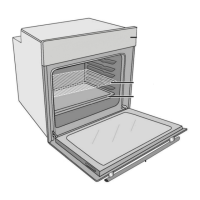
1.Take all baking trays and the wire shelves out of the
oven.
2.Close the oven door.
3.Select Static position.
4.Select the highest grill power; (See section on how
to operate the electric oven).
5.Operate the oven for about 30 minutes.
6.Turn off your oven; (See section on how to operate
the electric oven).
Grill oven
1.Take all baking trays and the wire shelves out of the
oven.
2.Close the oven door.
3. Select the highest grill power; (See section on how
to operate the grill).
4. Operate the grill about 30 minutes.
5. Turn off your grill; (See section on how to operate
the grill).
Smoke and smell may emit for a couple
of hours during the initial operation. This
is quite normal. Ensure that the room is
well ventilated to remove the smoke and
smell. Avoid directly inhaling the smoke
and the smell that emits.
1
Adjustment key
2
Keylock symbol
3
Clock symbol
4
Alarm volume symbol
5
Eco mode symbol
6
Plus key
7
Minus key
8
Time pie symbol
9
Alarm symbol
10
End of Cooking Time symbol
11
Cooking Time symbol
12 Program key
If the initial time is not set, clock will run
starting from 12:00 and the clock symbol
will be displayed. The symbol will
disappear once the time is set.
Current time settings are cancelled in
case of power failure. It needs to be
readjusted.
For appliances with a cooling fan
Final check: Check the functions.
The built-in
cooling fan
cools both the
built-in cabinet
and the front of
the appliance.
Please note that the cooling fan
may continue to run well after the
oven has been switched off. The
duration is dependent on the
selected operating temperature.
This is a built-in safety feature to
ensure that your oven is cooled
down correctly. To reduce the
cooling fan running time, the oven
door may be left ajar after the
oven has been switched off.
Please be cautious of hot
surfaces.
1 Cooling fan
2 Control panel
3 Door


 To Next Page
 Loading...