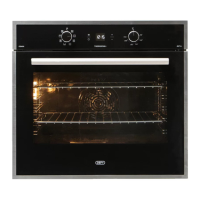
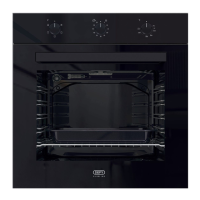
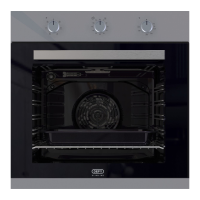
The Defy DBO774-Black DBO775-Mirror Gemini Petit Chef Plus Multifunction Oven is a versatile cooking appliance designed for domestic use, offering a range of functions for baking, roasting, grilling, and even air frying. This oven is manufactured to high-quality standards and incorporates several safety features to ensure reliable and trouble-free operation.
Function Description
The oven features a comprehensive control panel with a function knob, thermostat knob, and a digital timer display. The function knob allows users to select various operating modes, including:
- Operating with Fan: This mode activates only the fan in the rear wall without heating. It is suitable for thawing frozen granular food slowly at room temperature and for cooling down cooked food.
- Top and Bottom Heating (Static): In this mode, food is heated simultaneously from the top and bottom. It is ideal for cakes, pastries, or casseroles in baking moulds, and is recommended for cooking with one shelf only without a tray.
- Fan Assisted Heating: Warm air, heated by the top and bottom elements, is evenly distributed throughout the oven by the fan. This mode is suitable for cooking meals on different shelf levels and with two shelves.
- Thermofan Heating: Warm air, heated by the rear element, is evenly distributed throughout the oven by the fan. This mode is suitable for cooking meals on different rack levels, and preheating is generally not required. It is also suitable for cooking with multiple trays.
- Bottom Heating & Steam Clean: Only the bottom heating element is in operation. This mode is suitable for baking pizza and for browning food from the bottom. It also incorporates a steam clean function for easier maintenance.
- Turbo Grill: This mode provides a grilling effect, though not as strong as Full Grill. It is used for grilling small or medium-sized portions under the grill heater. Users should set the desired temperature and turn the food halfway through grilling.
- Full Grill: The large grill at the ceiling of the oven is in operation, suitable for grilling large amounts of meat. Users should place big or medium-sized portions in the correct rack position, set the temperature to maximum level, and turn the food halfway through grilling.
- "3D" Function & Air Fryer Mode: This mode combines top heating, bottom heating, and Thermofan heating for even and quick cooking all around. It is recommended for cooking with one shelf only. The Air Fryer mode utilizes a basket accessory on shelf position 4 and a bake tray on shelf position 1 for optimal air frying results.
The oven thermostat is marked with a 70°C position, which can be used to keep food warm.
Usage Features
The oven is designed for intuitive operation with several user-friendly features:
- Digital Timer: The digital timer allows users to set the time of day, cooking duration, and an end-of-cooking time. It also includes an alarm clock function for reminders.
- Time Setting: Upon initial energization, the oven requires time setting. The clock symbol flashes until the time is set, and current time settings are cancelled in case of a power failure, requiring readjustment.
- Cooking Time Setting: Users can set a specific cooking time, after which the oven will stop. The display shows a time slice symbol, which gradually turns off in four equal parts, indicating the remaining cooking time.
- End of Cooking Time Setting: After setting the cooking time, users can further set an end-of-cooking time. The oven calculates the startup time by deducting the cooking time from the set end time, activating the selected operating mode and heating to the set temperature at the appropriate moment.
- Alarm Clock: The timer can be used as an alarm clock for warnings or reminders, independent of the cooking program. The maximum alarm time is 23 hours and 59 minutes.
- Keylock Function: To prevent unintended operation, the oven features a keylock function. Once activated, oven keys become non-functional, and the keylock remains active even in case of power failure.
- Economy Mode: This energy-saving mode completes cooking using the oven's residual inner temperature by switching off heaters before the end of the cooking time.
- Screen Brightness Adjustment: Users can adjust the display brightness to their preference.
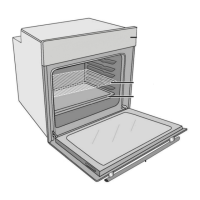
- Rack Positions: The oven is equipped with wire racks, and it is crucial to place wire shelves and trays correctly between the rails for optimal cooking performance. The manual provides guidance on proper placement, especially for grilling, where a baking tray can be placed on a lower rack to collect fats.
- Cooking Tips: The manual offers practical tips for baking cakes and pastries, roasting meat, and grilling various foods, including advice on temperature, cooking time, and proper dish placement. It also highlights the importance of using heat-resistant oven gloves when handling hot dishes.
- Air Fryer Mode Usage: Specific instructions are provided for the Air Fryer mode, including shelf configuration (basket on position 4, bake tray on position 1) and guidelines for safe handling of accessories and food items. It advises against using concentrated heating devices or open flames with the basket and recommends rotating the basket halfway through cooking for uniform results.
Maintenance Features
Regular maintenance ensures the longevity and optimal performance of the oven:
- General Cleaning: The appliance should be cleaned thoroughly after each use to remove cooking residues and prevent them from burning. Surfaces, including the cabinet, door, control panel, trims, and handles, should be wiped with a damp, hot soapy cloth. Abrasive powders, scouring pads, caustic cleaners, and steam cleaners should be avoided.
- Oven Cavity Cleaning: The oven cavity should be cleaned with a damp, hot soapy cloth after it has cooled down. Stubborn burnt soils may require soaking with a liquid cleaner or household ammonia before scrubbing. Excess liquid should always be wiped off.
- Stainless Steel/Inox Surfaces: Cleaning agents containing acid or chloride should not be used on stainless or inox surfaces and the handle. A soft cloth with a non-abrasive liquid detergent is recommended, wiping in one direction.
- Removable Shelves: For easier access during cleaning, the shelves can be removed.
- Steam Clean Function: The bottom heating mode includes a steam clean function. To use it, place a roast pan with 100 ml of water at the center of the oven floor, select the steam clean function, set to 90°C for 4 minutes, then switch off and leave for 25 minutes. Afterward, wipe the oven with a damp sponge and cloth, using warm water and washing liquid for persistent dirt. It is crucial to wipe away all moisture to prevent damage to oven components.
- Oven Door Removal: The oven door can be removed to improve access for cleaning. This involves opening the door, lifting clips at the hinge housing, and then closing and lifting the door to detach it. Reinstallation is the reverse process.
- Inner Glass Removal: The entire inner glass panel of the oven door can be removed for cleaning. This requires unscrewing the top door profile, removing the profile, and carefully taking out the glass. When refitting, ensure the bottom edge of the glass is securely placed in the plastic slots, and the printed side of the panel faces inwards.
- Oven Light Bulb Replacement: The oven light bulb is a special electric light bulb designed to resist up to 300°C. Before replacing, the appliance must be disconnected from the mains and cooled down. For square lamps, remove wire racks, then the protective glass cover with a screwdriver, unscrew the old lamp, and replace it. For round lamps, turn the glass cover counter-clockwise to remove it, replace the lamp, and reinstall the cover.
- Wire Rack Removal: Instructions are provided for removing the wire racks by pulling them in specific directions to unclip them from the oven cavity.
The manual emphasizes safety throughout, warning against hot surfaces, electric shock, and fire hazards, and advises users to always consult authorized service agents for installation and repairs. It also provides a customer care line for support and outlines warranty conditions.

 Need help?
 General

 To Next Page