MAINTENANCE
48 MAINTENANCE
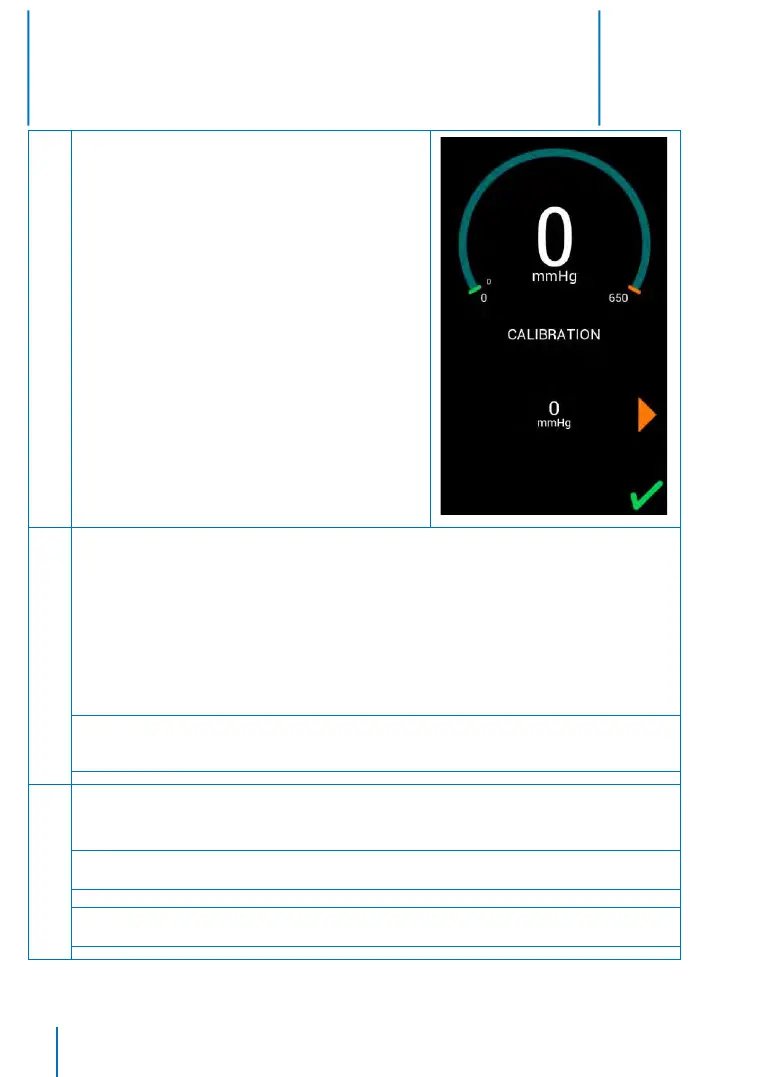
Calibrating Zero Pressure:
• Once start-up sequence completes, the unit will enter
the Calibration mode and display “0 mmHg” under a
PRESSURE indicator
• With the hose connector on the PTS ii, open to
atmosphere, touch the CONFIRM button to indicate zero
reference pressure is applied. The unit will adjust the
transducer output corresponding to zero pressure. The
unit will then sound a tone and the “0 mmHg” will turn
green to indicate that the reference pressure was taken
Calibrating 100 mmHg:
• Once the zero point is calibrated, press the SCROLL RIGHT button to advance the unit to the next
pressure level. The display will now show “100 mmHg”
• Connect the PTS ii to the pressure source and a reference pressure gauge
• Apply a calibrated reference pressure of 100 ± 1 mmHg to the cuff port
• Once the pressure has stabilized, press the CONFIRM button to indicate the reference pressure is
applied. The unit will adjust the transducer output corresponding to 100 mmHg. The unit will then
sound a tone and the “100 mmHg” will turn green to indicate that the 100 mmHg reference pressure
was taken
Note: If the reference pressure is more than 15 mmHg difference from the sensed pressure, the unit will
sound an alarm tone and will not accept the pressure applied. If this happens, try to adjust it to a correct
pressure
Calibrating 300 mmHg and 600 mmHg:
• Repeat the preceding step for reference pressures of 300 ± 1 mmHg and 600 ± 1 mmHg
Note: At any time, touch the SCROLL LEFT or SCROLL RIGHT buttons to switch between pressure levels for
calibration
Note: The unit will not allow calibration points to be missed. For calibration purposes the device must be
able to inflate above the maximum desirable set pressure.


 To Next Page