OPERATING INSTRUCTIONS
33 OPERATING INSTRUCTIONS
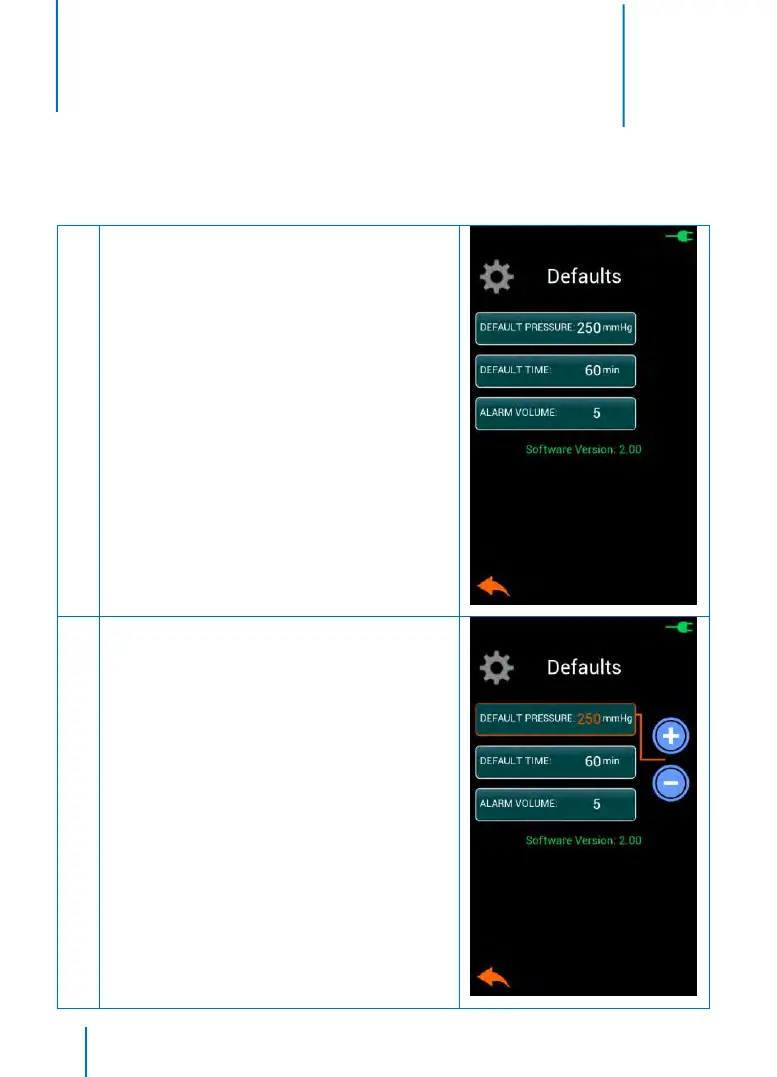
SYSTEM DEFAULTS MENU
The System Defaults Menu allows user to set the default protocol, default lockout time, alarm volume, and restore
instrument to factory defaults. It also shows the unit’s software version. The default settings will be selected when the
instrument is powered ON.
Accessing the System Defaults Menu:
• Touch the DEFAULTS button from the Settings Menu
to access the System Defaults Menu
• Touch the BACK button to return to the Main Screen
as necessary
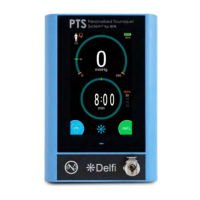
Adjusting Default Parameters:
• From the System Defaults Menu, touch an adjustable
parameter button then use the INCREMENT and
DECREMENT buttons to modify the selected default
parameter
• The volume can be changed to accommodate
different environmental conditions so that the audio
alarm can be reliably detected without being too
intrusive in most situations. The PTS ii has nine
volume levels ranging from approximately 65 dB to a
minimum of 75 dB when measured at 1 meter from
the center of the touch screen.


 To Next Page