Chapter 4
4 - 2
Configuring the interfaces
Typically, a 3-DNS Controller has two network interfaces. The following
sections describe the naming convention, displaying the status, setting the
media type, and setting the duplex mode for the interfaces in the 3-DNS
Controller.
Understanding the interface naming convention
By convention, the Ethernet interfaces on a 3-DNS Controller take the name
<s>.<p> where s is the slot number of the NIC, and p is the port number on
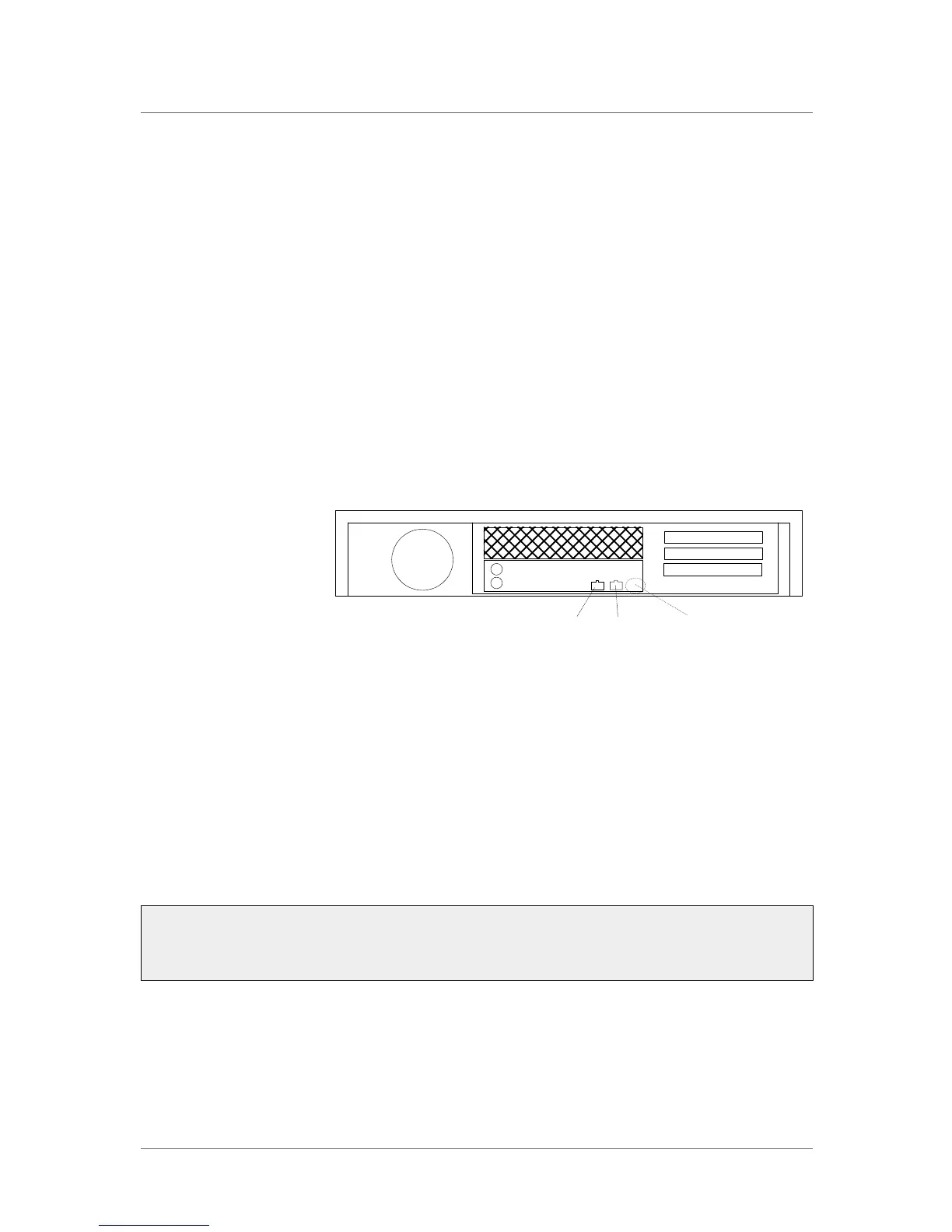
the NIC. For the 2U platform, slot numbering is top-to-bottom, and port
numbering is left-to-right as shown in Figure 4.1.
Figure 4.1 Rear view of a 3-DNS Controller with two interface ports
Displaying status for interfaces
Use the following syntax to display the current status and the settings for the
installed interface cards:
b interface show
Figure 4.2 is an example of the output you see when you issue this
command.
Use the following syntax to display the current status and the setting for a
specific interface.
b interface <if_name> show
interface speed pkts pkts pkts pkts bits bits errors trunk STP
Mb/s in out drop coll in out
1.1 UP 100 HD 0 213 0 0 0 74.2K 0
2.1 UP 100 HD 20 25 0 0 28.6K 33.9K 0
Figure 4.2 The bigpipe interface show command output
Port 1
Port
designator
Port 2
1.1
1.2
Expansion Slot
Expansion Slot
Expansion Slot



 To Next Page