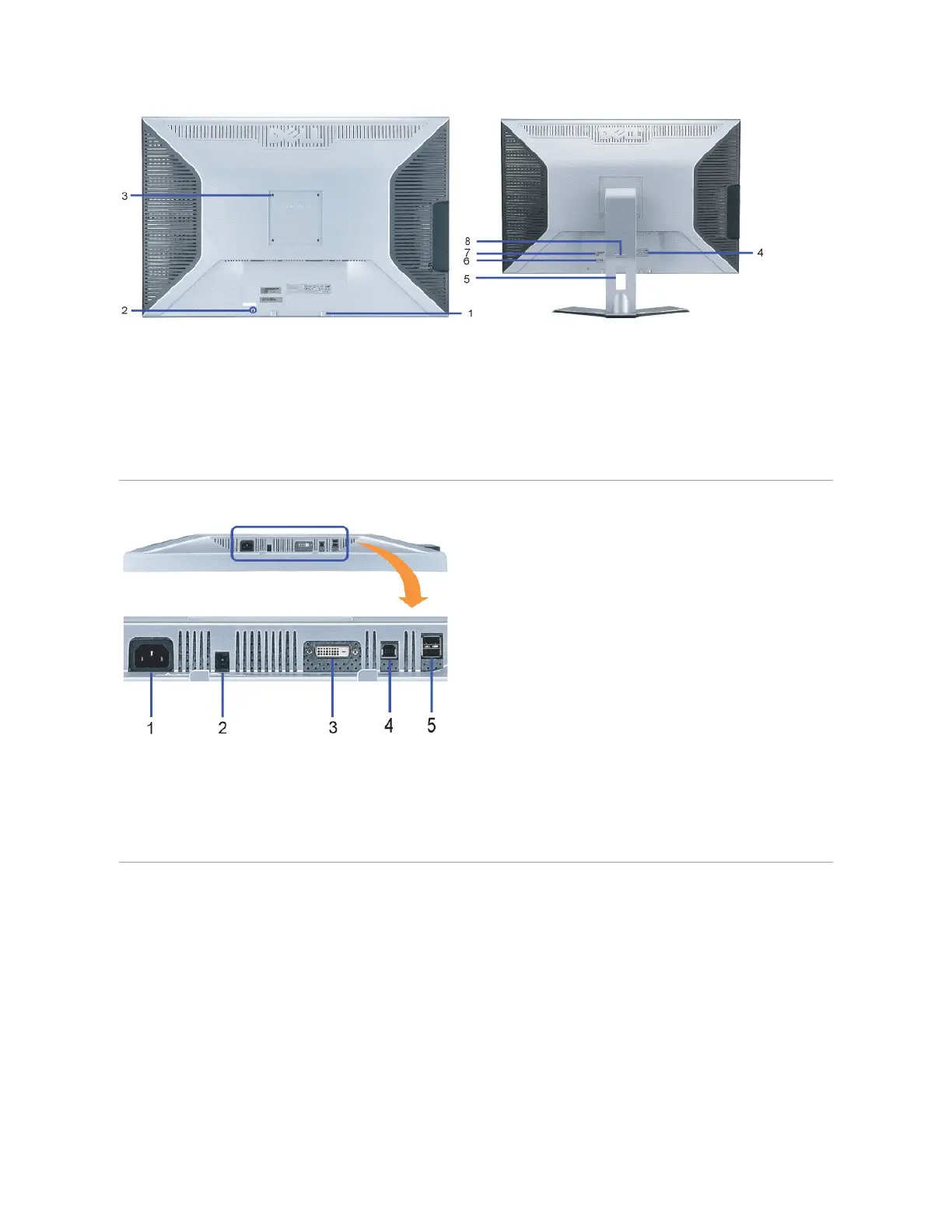
Dell Soundbar mounting brackets — Attach the optional Dell Soundbar.
Security lock slot —Attach a lock to secure your monitor.
VESA mounting holes (100mm [Behind attached base plate]) — Use to mount the monitor.
Regulatory rating label — Lists the regulatory approvals.
Cable management hole — Organize cables by placing them through the hole.
Service tag label— Refer to this label if you need to contact Dell for technical support
Barcode serial number label
Lockdown/releasebutton— Push the monitor down, press the button to unlock the monitor, and then lift the
monitor to the desired height.
Power - Connect the power
Dell Soundbar power connector - Connect for the Soundbar (optional)
DVI connector - Connect your computer DVI cable
USB upstream port -ConnecttheUSBcablethatcamewithyourmonitortothemonitorandthecomputer.Oncethiscableisconnectedyoucanusethe
USBconnectorsonthesideandbottomofthemonitor.
USB downstream port - Connect your USB devices. You can only use this port after you have connected the USB cable to the computer and USB upstream
port on the monitor.








 To Next Page