34
|
Operation
To select an option:
1 When scrolling through the settings, the present setting displays for each selection.
2 Press the button to select the option.
The current setting for the option flashes when selected.
3 Use the or buttons to toggle the available options.
4 Set the new option by holding the button again for one second.
The option stops flashing.
Changing the Language
Language selection is controlled through the user settings. See Table 6 page 42 for information on
available languages.
Display Functions
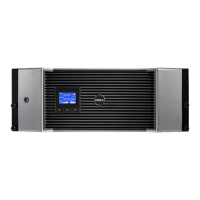
The UPS provides useful information about the UPS itself, load status, events, measurements,
identification, and settings through the front panel display.
Startup Screen
During startup, the Dell logo is the default screen. This startup screen displays for five seconds and then
defaults to the UPS status summary screen.
The display automatically returns to the UPS status summary screen when no button has been pushed
for 15 minutes and no other screen has been locked by a user. When you return to the status summary
screen, press the
button for one second to exit back to the menu selections. Selecting UPS Status
from the main menu list enables you to scroll through all of the UPS status menu screens, including the
status summary screen.


 To Next Page