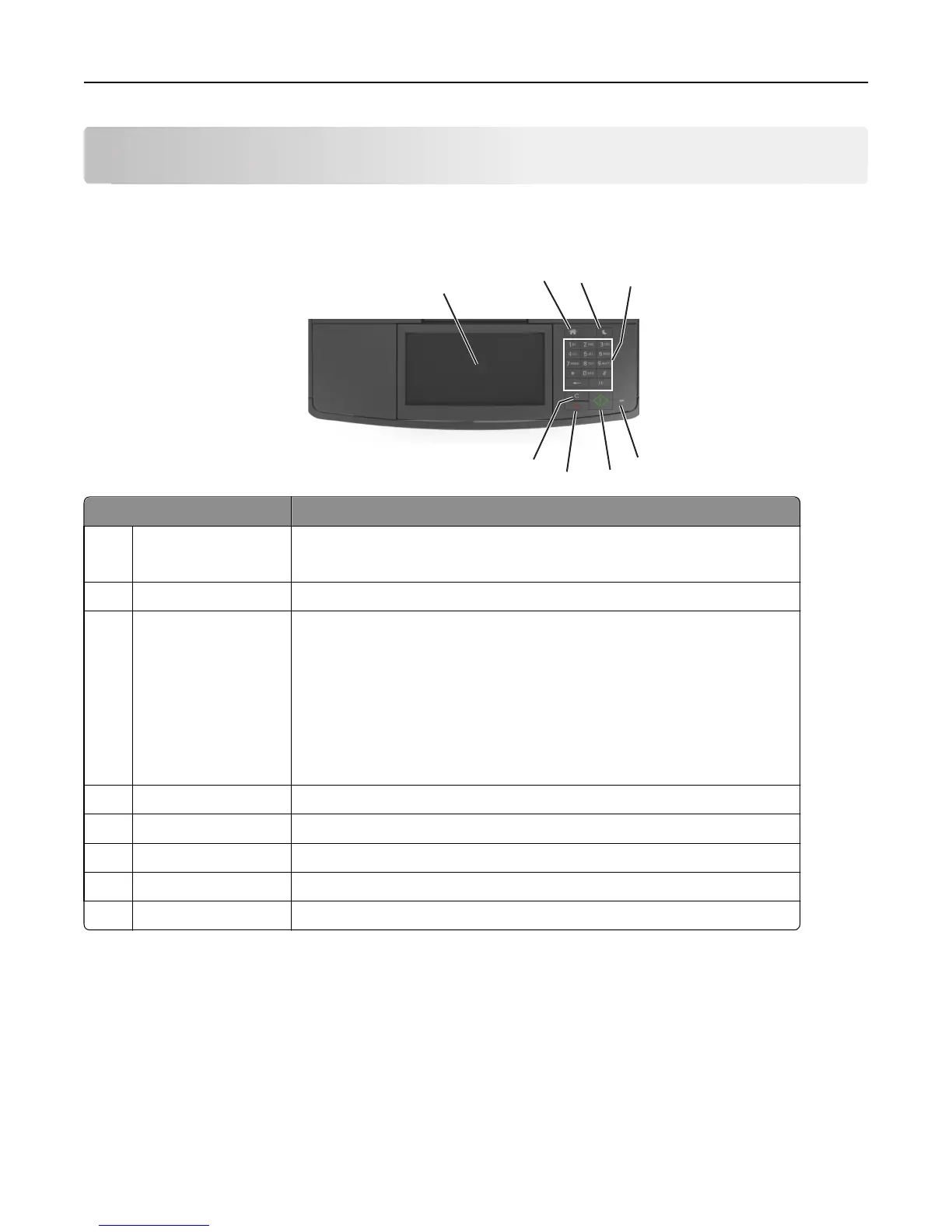
Understanding the printer control panel
Using the printer control panel
1
2
3
4
5
6
7
8
Use the To
1 Printer control panel
• View the printer status and messages.
• Set up and operate the printer.
2 Home button Go to the home screen.
3 Sleep button Enable Sleep mode or Hibernate mode.
Do the following to wake the printer from Sleep mode:
• Press any hard button.
• Open a door or cover.
• Send a print job from the computer.
• Perform a power‑on reset (POR) with the main power switch.
• Attach a device to the USB port on the printer.
4 Keypad Enter numbers, letters, or symbols.
5 Indicator light Check the status of the printer.
6 Start button Start a job, depending on which mode is selected.
7 Cancel button Stop all printer activity.
8 Clear All / Reset button Reset the default settings of a function, such as printing, copying, or e-mailing.
Understanding the colors of the indicator and Sleep button
lights
The colors of the indicator and Sleep button lights on the printer control panel signify a certain printer status or condition.
Understanding the printer control panel 16












 To Next Page