About your monitor | 13
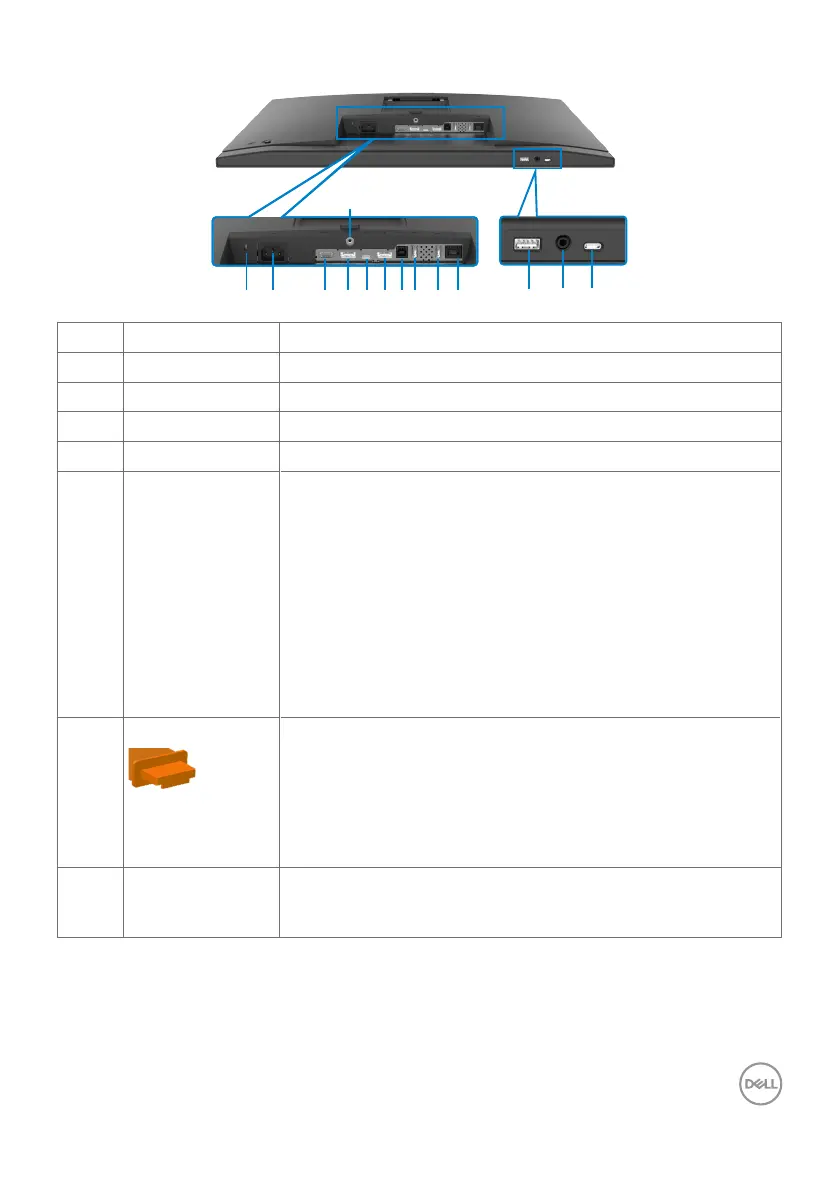
Bottom view
1 4 5 6 7 8
14
32
13
9
10
11 12
Label Description Use
1 Security lock slot Secures monitor with security cable lock (sold separately).
2 Power connector Connect the power cable.
3 HDMI port Connect your computer with the HDMI cable.
4 DisplayPort in Connect your computer with the DisplayPort cable.
5 USB Type-C
upstream/
DisplayPort
Connect to your computer using the USB Type-C cable.
The USB Type-C port offer the fastest transfer rate (USB
3.2 Gen 1) and the alternate mode with DP 1.2 (C2422HE/
C3422WE) / DP 1.4 (C2722DE) support the following, and
PD 20 V/4.5 A, 15 V/3 A, 9 V/3 A, 5 V/3 A.
• C2422HE maximum resolution of 1920 x 1080 at 60 Hz
• C2722DE maximum resolution of 2560 x 1440 at 60 Hz
• C3422WE maximum resolution of 3440 x 1440 at 60 Hz
NOTE: USB Type-C is not supported on Windows versions
that are prior to Windows 10.
6 DP port (out)
DP output for MST (multi-stream transport) capable
monitor. To enable MST, refer to instruction on section
“Connecting the Monitor for DP MST Function”.
NOTE: Remove the rubber plug when using DP out
connector.
NOTE: The port is only for C2422HE/C2722DE.
7 USB-B upstream
port
Connect the USB cable that comes with your monitor to
the computer. Once this cable is connected, you can use
the USB downstream connectors on the monitor.



 To Next Page