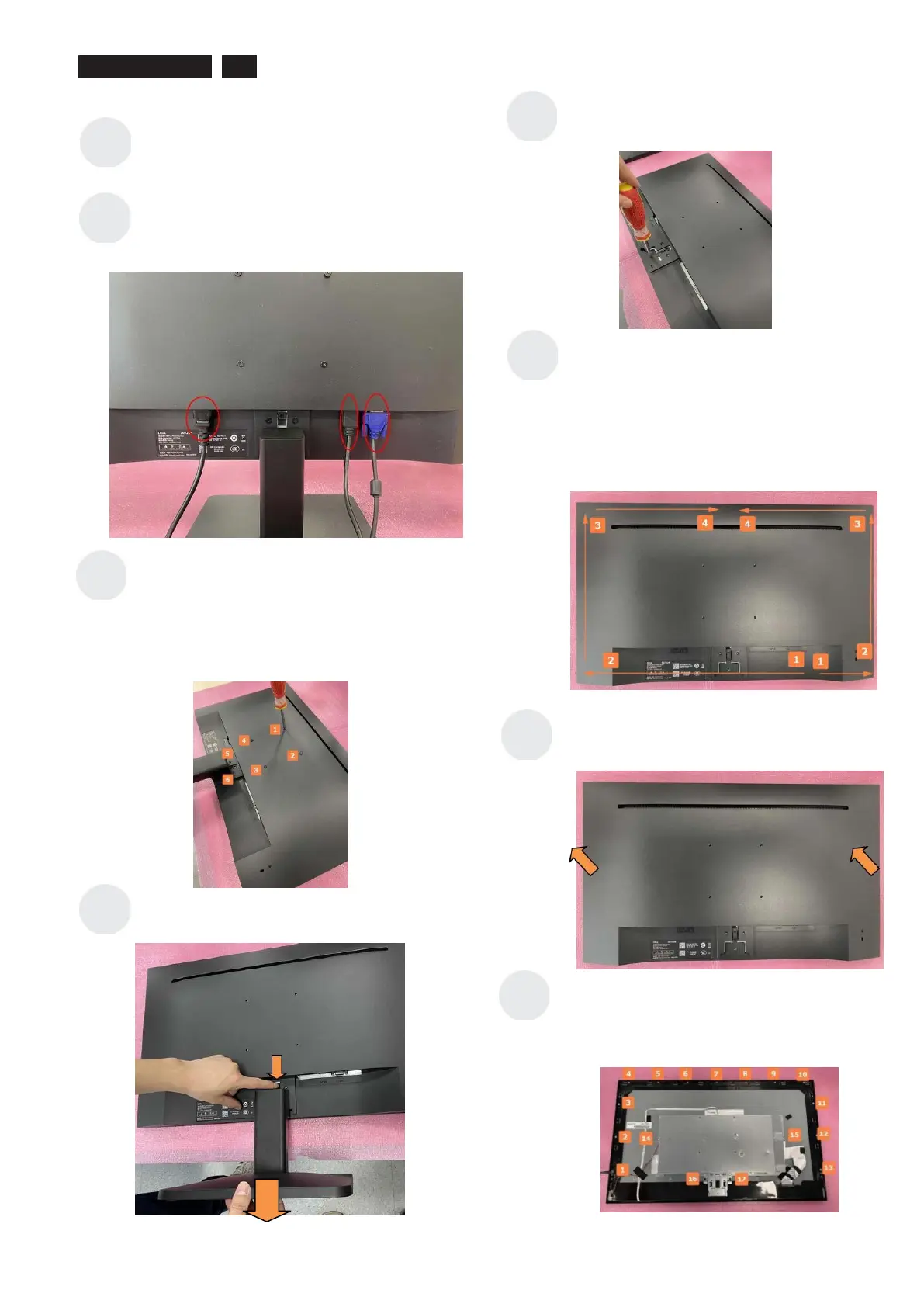
1 Disassembly Procedures:
Turn off power
Unplug external cables from product
Use a Philips‐ head screwdriver to
remove 6 screws for unlocking
mechanisms.
(No.1~4 screw size=M4x10; Torque=7.5~8.5kgfxcm
No.5~6 screw size=M4x5; Torque=5~6kgfxcm.)
Use your finger to push the button , then
pull out the stand .
Use a Philips‐ head screwdriver to remove
1screw for unlockingmechanisms.
(Screw size=M3x6; Torque=4.5~6.5 kgfxcm)
Wedge your fingers(or plastic picks )
between the rear cover and the middle bezel
on the corners of the bottom side of the
monitor to release the rear cover, then pull
up carefully the rear cover in order of arrow
preference for unlocking mechanisms of rear
cover.
Put it on a protective cushion and remove
the rear cover.
Use a Philips‐head screwdriver to remove
17 screws for unlocking mechanisms.
(No.1~15 screw size=M3x4; Torque=4.5~6.5kgfxcm
No.16~17 screw size=M3x3; Torque=4.5~6.5kgfxcm.)












 To Next Page