Pairing your wireless keyboard
│
17
3 Pair your wireless keyboard with your Bluetooth-enabled computer.
Swift Pair:
a. In Windows Search, type Bluetooth.
b. Click Bluetooth and other devices settings. The Settings window appears.
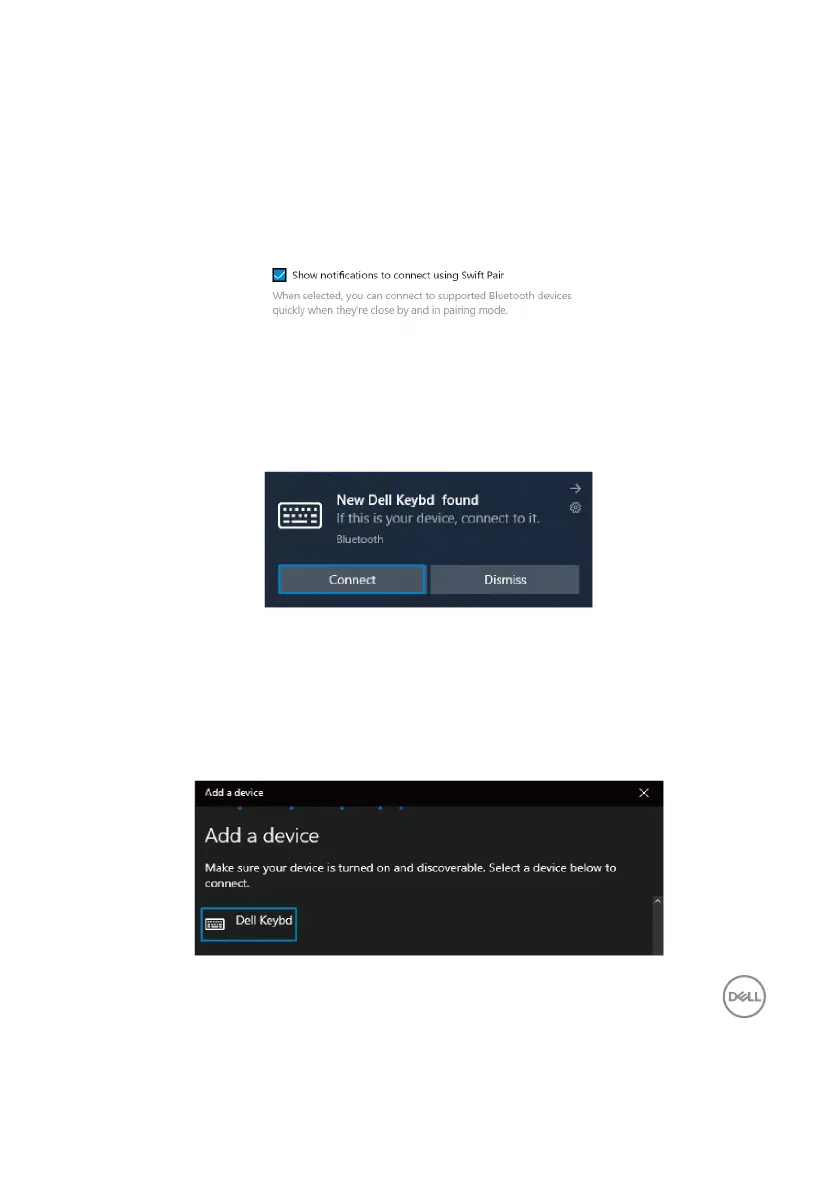
c. Ensure that the “Show notifications to connect using Swift Pair” box is checked.
d. Ensure that the Bluetooth is turned on.
e. Place your wireless keyboard near your computer. The New Dell Keybd found window
appears.
f. Click Connect and confirm the pairing process on both wireless keyboard and your
computer.
Add Device:
a. In Windows Search, type Bluetooth.
b. Click Bluetooth and other devices settings. The Settings window appears.
c. Ensure that the Bluetooth is turned on.
d. Click Add Bluetooth or other device > Bluetooth.
e. From the list of available devices, click Dell Keybd.



 To Next Page