16
│
Pairing your wireless keyboard
Pairing device three using Bluetooth
NOTE: You can connect a third device to your wireless keyboard using
Bluetooth.
NOTE: Before pairing your wireless keyboard using Bluetooth, ensure that you
unpair the inactive devices on your computer, and update the Bluetooth driver
on your Dell computer to the latest version. For more information, see Drivers &
Downloads at Dell.com/support.
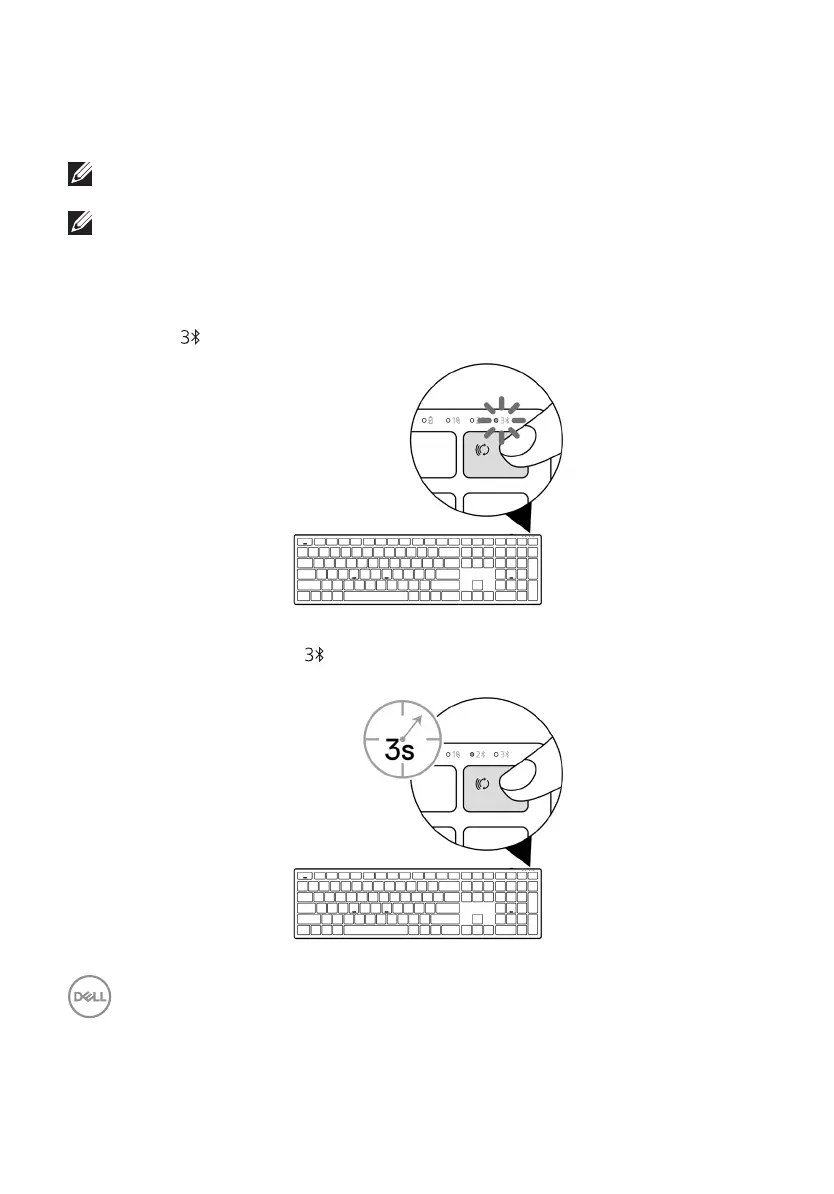
1 Press the connection-mode button a few times on your keyboard until the connection-
mode light ( BLE-3) turns on, indicating that the third-Bluetooth connection is selected.
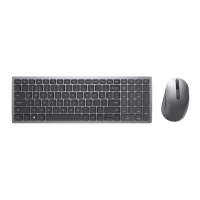
2 Press and hold the connection-mode button for 3 seconds to initiate pairing.
The connection-mode light ( ) blinks for 3 minutes, indicating your wireless keyboard is
in the pairing mode.



 To Next Page