The Dell Latitude 11 Keyboard (K12M) is a versatile accessory designed to enhance the functionality of the Dell Latitude 11 tablet, transforming it into a more traditional laptop-like experience. This keyboard serves as an expansion base, providing a physical keyboard for improved typing efficiency and a trackpad for precise navigation, which are crucial for productivity tasks.
Function Description:
The primary function of the Dell Latitude 11 Keyboard is to provide a tactile input method for the Dell Latitude 11 tablet. It allows users to type documents, emails, and other text-based content more comfortably and quickly than with an on-screen virtual keyboard. Beyond typing, the integrated trackpad offers a familiar cursor control experience, enabling users to interact with the tablet's interface, select items, and navigate applications with greater precision. The keyboard also acts as a protective cover for the tablet's screen when closed, safeguarding it from scratches and minor impacts during transport. Furthermore, it incorporates a charging capability for the keyboard itself, ensuring that it remains powered for extended use. The design facilitates easy connection and disconnection of the tablet, allowing for seamless transitions between laptop and tablet modes. The manual also references the use of a "Dell mini Active Pen," suggesting that the Latitude 11 ecosystem supports pen input for tasks like note-taking, drawing, or precise interaction with applications.
Important Technical Specifications:
- Model Name: Dell Latitude 11 Keyboard (K12M)
- Regulatory Model: K12M
- Regulatory Type: K12M001
- Rated Voltage: 100-240 V (AC Voltage)
- Rated Frequency: 50/60 Hz
- Rated Input Current: 0.9 A (30 W)
- Manufacturing Year: Referenced on the outer box label or barcode label.
- Manufacturing Number: Referenced on the outer box barcode label.
- Country of Production: Referenced on the outer box label.
- Importer/Manufacturer (Taiwan): Dell Enterprise Co., Ltd. Taiwan Branch
- Importer/Manufacturer Address (Taiwan): 20F, No. 218, Dunhua S. Rd. Sec. 2, Taipei City
- Importer/Manufacturer Phone (Taiwan): 00801-861-011
Usage Features:
The Dell Latitude 11 Keyboard is designed for ease of use and versatility.
- Connecting the Tablet: The tablet can be easily connected to the keyboard. The visual guide shows the tablet being aligned and gently pressed into a slot on the keyboard, indicating a secure physical and electrical connection. This transforms the tablet into a laptop-like form factor.
- Disconnecting the Tablet: Detaching the tablet is equally straightforward. The guide illustrates a mechanism (likely a latch or button) that, when activated, allows the tablet to be lifted and separated from the keyboard. This enables users to quickly switch back to tablet-only mode for touch-centric tasks or portability.
- Charging the Keyboard: The keyboard itself requires charging to power its internal components. The manual depicts a charging port on the keyboard, where a cable (presumably a USB-C or proprietary connector) can be plugged in. The charging process is shown with an indicator light, suggesting visual feedback on the charging status.
- Using the Dell mini Active Pen: While the keyboard's primary function is input, the manual also highlights the use of a Dell mini Active Pen with the Latitude 11 tablet. This suggests support for stylus input, which can be beneficial for tasks requiring precision, such as drawing, handwriting, or annotating documents directly on the tablet's screen. The pen likely offers pressure sensitivity and may have programmable buttons for enhanced functionality.
- Portability and Protection: When the tablet is docked and the keyboard is closed, it forms a compact unit, making it easy to carry. The keyboard's sturdy construction also provides a layer of protection for the tablet's screen against everyday bumps and scratches.
Maintenance Features:
The manual emphasizes the importance of referring to accompanying documentation for detailed maintenance and safety information.
- Safety, Environmental, and Regulatory Information: A dedicated document titled "Safety, Environmental, and Regulatory Information" is provided, which is crucial for understanding safe operation, environmental guidelines, and compliance with regulatory standards.
- Quick Start Guide: A "Quick Start Guide" is included to help users get started with the device quickly, covering basic setup and initial usage.
- Product Support and Manuals: Users are directed to Dell's official support websites (Dell.com/support and Dell.com/support/manuals) for comprehensive product support, troubleshooting, and access to full user manuals.
- Regulatory and Safety Information: Further regulatory and safety details can be found at Dell.com/regulatory_compliance.
- Contact Dell: For direct assistance, users can contact Dell via Dell.com/contactdell.
- Important Notes (注意事項): The manual explicitly states to "refer to the user manual" for important notes, product functions, and emergency handling procedures, indicating that detailed instructions for these aspects are available in the full documentation. This suggests that while the quick start guide provides an overview, comprehensive information regarding troubleshooting, cleaning, and other maintenance tasks would be found in the complete user manual. The device is manufactured in China, and the manual is printed in 2015-09.

 Need help?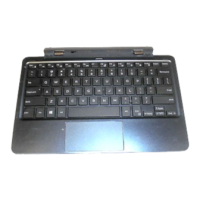

 To Next Page
 General