Using Your Projector 17
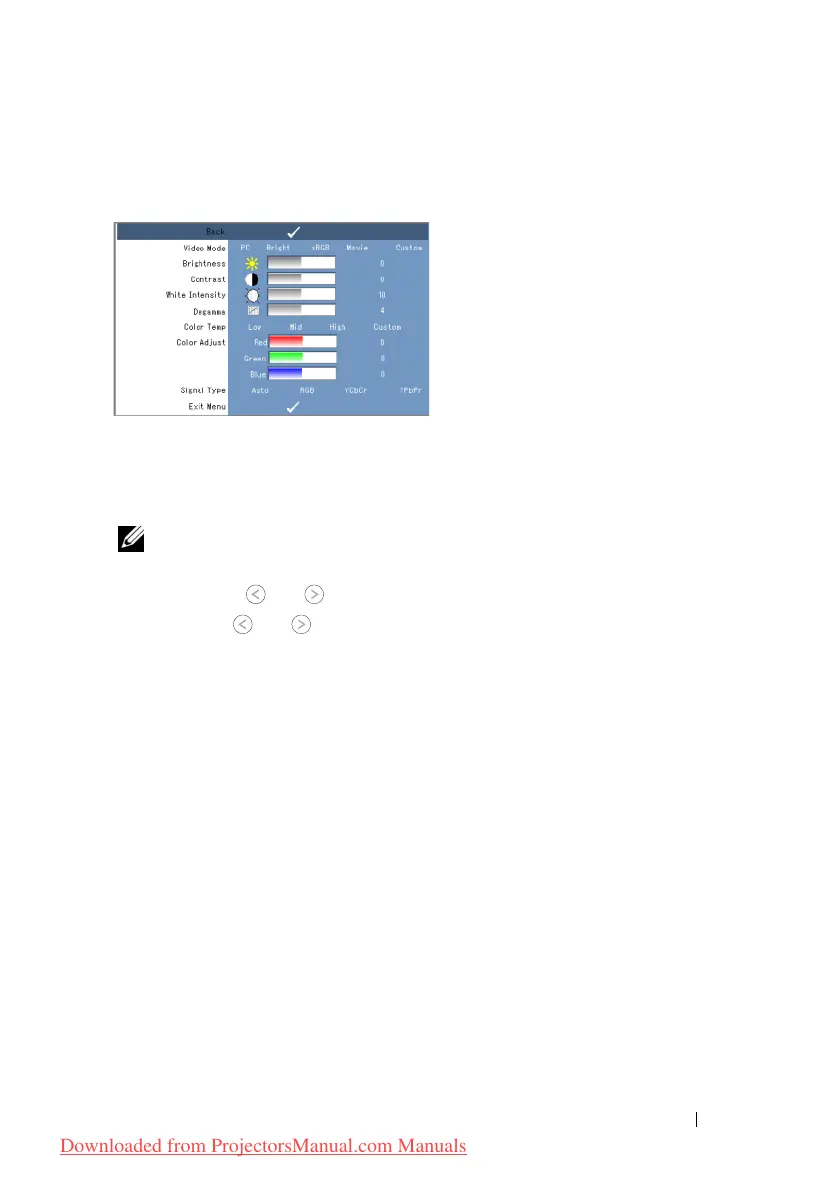
PICTURE (in PC Mode)
Using the Picture menu, you can adjust the display settings of your projectors. The
Picture menu provides the following options:
V
IDEO MODE—Allows you to optimize the projector’s display mode: PC, Bright, sRGB
(provides more accurate color representation), Movie, and Custom (set your preferred
settings). If you adjust the settings for White Intensity or Degamma, the projector
automatically switches to Custom.
NOTE: If you adjust the settings for White Intensity or Degamma, the projector
automatically switches to Custom.
B
RIGHTNESS—Use and to adjust the brightness of the image.
C
ONTRAST—Use and to adjust the display contrast.
W
HITE INTENSITY—Set 0 to maximize the color reproduction and 10 to maximize the
brightness.
D
EGAMMA—Allows you to adjust among the 4 preset values (1, 2, 3, 4) to change the
color performance of the display.
C
OLOR TEMP—Allows you to adjust the color temperature. The screen appears cooler at
higher color temperatures and warmer at lower color temperatures. When you adjust
the values in the Color Adjust menu, the Custom mode is activated. The values are
saved in the Custom mode.
C
OLOR ADJUST—Allows you to manually adjust the red, green, and blue colors.
S
IGNAL TYPE—Manually select signal type Auto, RGB, YCbCr, or YPbPr.
PICTURE (in Video Mode)
Using the Picture menu, you can adjust the display settings of your projectors. The
Downloaded from ProjectorsManual.com Manuals



 To Next Page