3. Remove the battery.
4. Remove the rear cover.
5. Remove the solid-state drive.
6. Remove the wireless card.
7. Remove the memory modules.
8. Remove the system board.
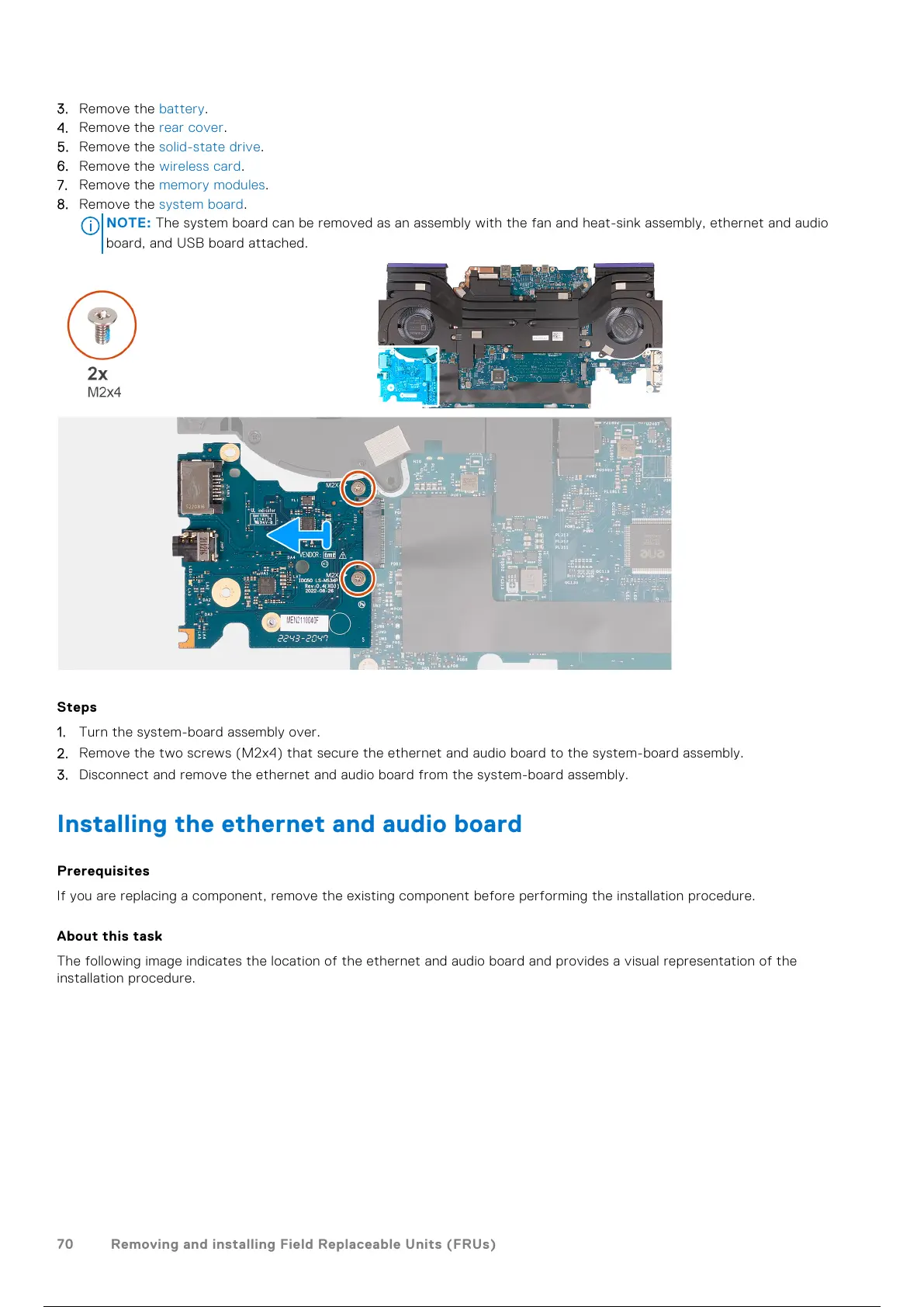
NOTE: The system board can be removed as an assembly with the fan and heat-sink assembly, ethernet and audio
board, and USB board attached.
Steps
1. Turn the system-board assembly over.
2. Remove the two screws (M2x4) that secure the ethernet and audio board to the system-board assembly.
3. Disconnect and remove the ethernet and audio board from the system-board assembly.
Installing the ethernet and audio board
Prerequisites
If you are replacing a component, remove the existing component before performing the installation procedure.
About this task
The following image indicates the location of the ethernet and audio board and provides a visual representation of the
installation procedure.
70
Removing and installing Field Replaceable Units (FRUs)
71 / 101 70 / 99 71 / 101



 To Next Page