6. Install the:
• bezel
• cover
7. Follow the procedure in After Working Inside Your Computer.
Removing the VGA daughter board
1. Follow the procedure in Before Working Inside Your Computer.
2. Remove the:
• cover
• bezel
3. Open the front bezel door
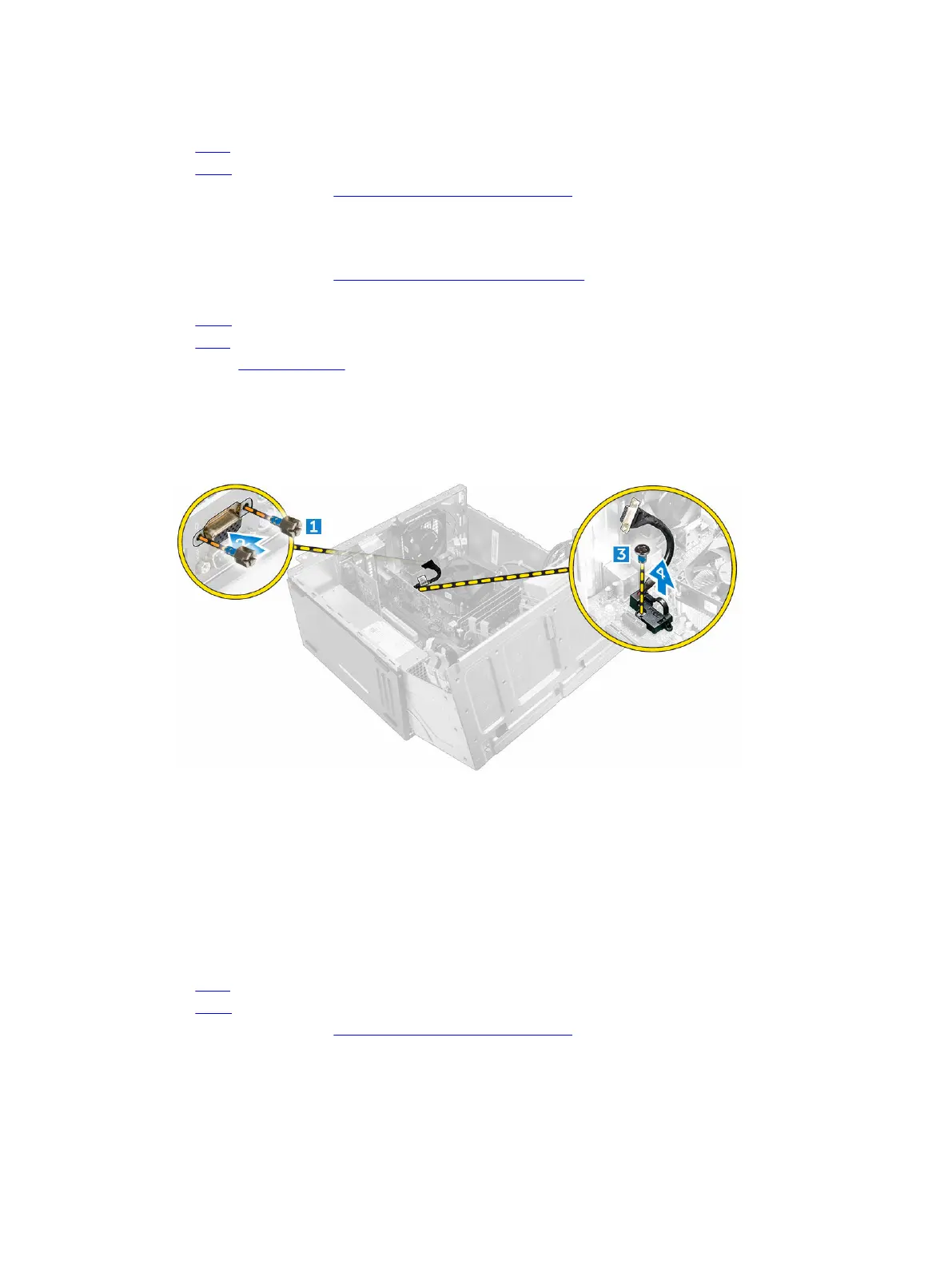
4. To remove the VGA daughter board:
a. Remove the screws that secure the VGA connector to the computer [1].
b. Slide the VGA connector to release it from the computer [2].
c. Remove the screw that secures the VGA daughter board to the computer [3].
d. Lift the VGA daughter board using the handle to remove it from the computer [4].
Installing the VGA daughter board
1. Align the VGA daughter board with the screw holder on the system board.
2. Tighten the screw to secure the VGA daughter board to the system board.
3. Insert the VGA connector into the slot at the back of the computer.
4. Tighten the screws to secure the VGA connector to the computer.
5. Close the front bezel door.
6. Install the:
• bezel
• cover
7. Follow the procedure in After Working Inside Your Computer.
18












 To Next Page