EasyManua.ls Logo

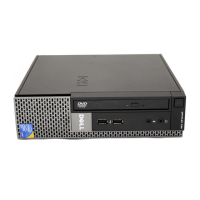
Dell OptiPlex 5080 Small Form Factor - User Manual

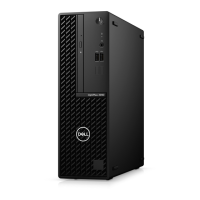
Dell OptiPlex 5080 Small Form Factor
51 pages
Print Icon
To Next Page IconTo Next Page
Loading...
OptiPlex 5080 Small Form Factor
Service Manual
Regulatory Model: D15S
Regulatory Type: D15S001
May 2020
Rev. A00

Table of Contents

Other manuals for Dell OptiPlex 5080 Small Form Factor

Questions and Answers

  • K
    Kara JensenSep 5, 2025
    Why does my Dell OptiPlex 5080 Small Form Factor Desktop have 'PCIe Device or Video Subsystem Failures'?
    • A
      Austin LewisSep 5, 2025
      PCIe device configuration activity is in progress or PCIe device failure was detected. If you can assist with troubleshooting, try reseating the PCIe card and removing them one by one to determine which card failed. If a PCIe card is identified as failed, replace it. If none of the PCIe Cards failed, replace the motherboard.
  • E
    eruizSep 4, 2025
    What to do if my Dell Desktop has Flash corruption detected by SBIOS?
    • D
      Debra BaldwinSep 4, 2025
      Flash corruption was detected by SBIOS. If the problem persists, replace the system board.
  • C
    Christy HughesSep 3, 2025
    What to do if my Dell OptiPlex 5080 Small Form Factor has a BIOS recovery image not found error?
    • L
      Lee BaxterSep 3, 2025
      Flash the latest BIOS version. If the problem persists, replace the system board.
  • S
    Samantha SchroederAug 27, 2025
    What causes power rail failure on Dell Desktop?
    • I
      Isaac RomeroAug 27, 2025
      If your Dell Desktop experiences a power rail failure, it means that EC ran into power sequencing failure. If the problem persists, replace the system board.
  • P
    patriciabakerAug 27, 2025
    What to do if auxiliary device failure on Dell Desktop?
    • M
      meghangrayAug 27, 2025
      If your Dell Desktop experiences an auxiliary device failure, the touchpad or external mouse may be faulty. For an external mouse, check the cable connection. Enable the Pointing Device option in the System Setup program.
  • U
    uparsonsSep 18, 2025
    How to fix drive not ready error on Dell OptiPlex 5080 Small Form Factor?
    • M
      matthewchavezSep 18, 2025
      If your Dell Desktop displays 'DRIVE NOT READY', install a hard drive in the hard drive bay.
  • A
    Anthony HoodSep 23, 2025
    What to do for System board failure (included BIOS corruption or ROM error) in Dell Desktop?
    • M
      Mary JohnsonSep 23, 2025
      Flash the latest BIOS version on your Dell Desktop. If the problem persists, replace the system board.
  • J
    Joshua OrrSep 8, 2025
    How to resolve a 'BIOS Checksum Failure' on a Dell Desktop?
    • R
      Richard SosaSep 8, 2025
      If your Dell Desktop displays a 'BIOS Checksum Failure', the system is in Recovery Mode. Flash the latest BIOS version. If the problem continues, replace the motherboard.
  • R
    Ray SalazarSep 5, 2025
    What does 'Decreasing Available Memory' mean on my Dell Desktop and how to fix it?
    • K
      Kerry WalkerSep 5, 2025
      If your Dell Desktop displays 'Decreasing Available Memory', it indicates that one or more memory modules might be faulty or not properly seated. Try reinstalling the memory modules, and replace them if necessary.
  • P
    Peter FisherSep 4, 2025
    What does i-Fuse failure mean on Dell Desktop?
    • D
      Dr. Sheryl JohnsonSep 4, 2025
      This error is only applicable for factory testing.

Dell OptiPlex 5080 Small Form Factor Specifications

General IconGeneral
BrandDell
ModelOptiPlex 5080 Small Form Factor
CategoryDesktop
LanguageEnglish

Related product manuals