Steps
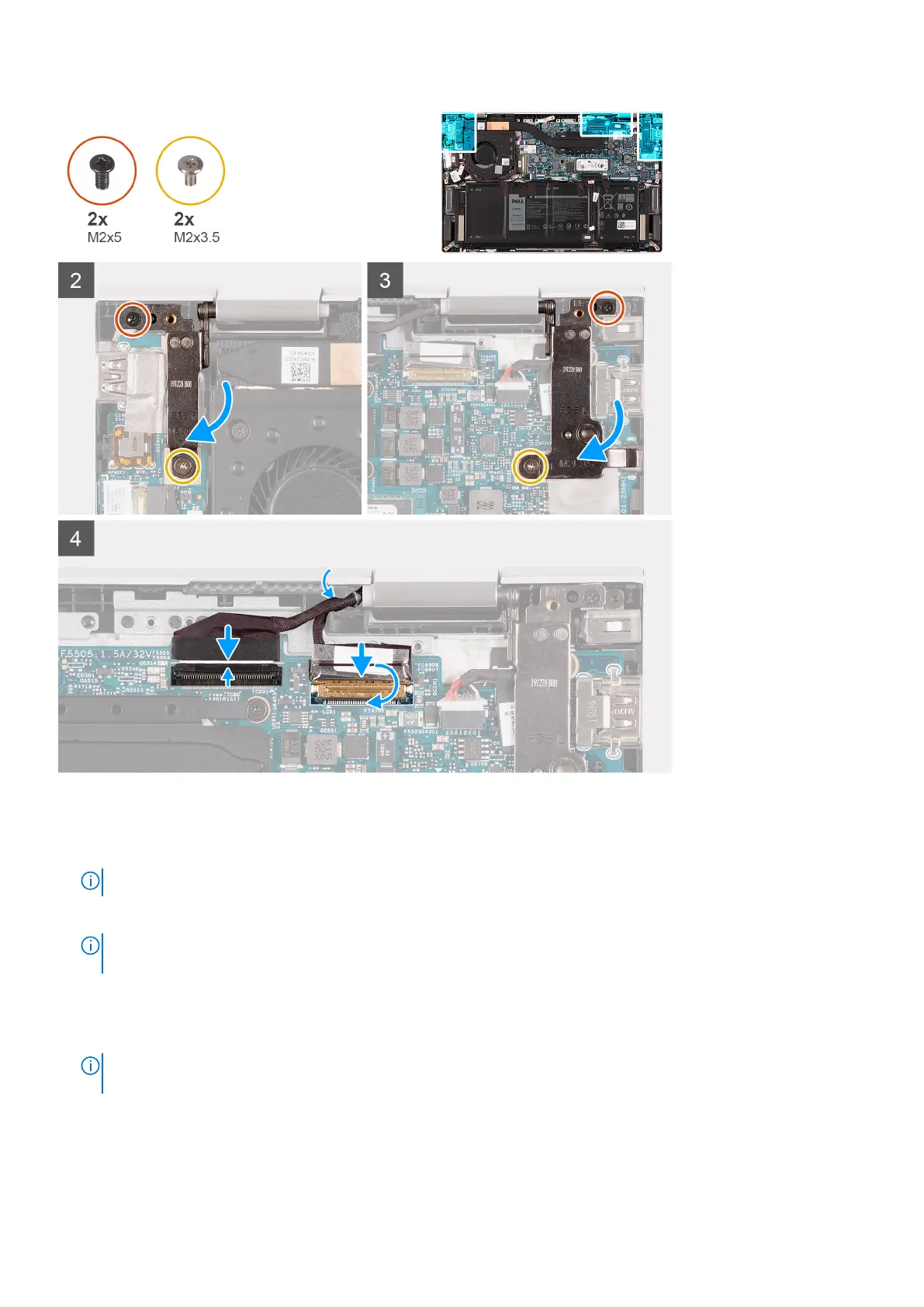
1. Align the hinges on the display assembly with the slots on the palm-rest assembly.
2. Place the palm-rest assembly on the display assembly at an angle.
NOTE: To avoid damaging your system do not slide the palm-rest assembly on the display assembly.
3. Close the left display-hinge.
NOTE:
Ensure that the screw holes on the left display-hinge are aligned with the screw holes on the system board and
palm-rest assembly
4. Replace the screw (M2x5) that secures the left display-hinge to the palm-rest assembly.
5. Replace the screw (M2x3.5) that secures the left display-hinge to the I/O-board and palm-rest assembly.
6. Close the right display-hinge.
NOTE:
Ensure that the screw holes on the right display-hinge are aligned with the screw holes on the I/O board and
palm-rest assembly
7. Replace the screw (M2x5) that secures the right display-hinge to the palm-rest assembly.
8. Replace the screw (M2x3.5) that secures the right display-hinge to the system board and palm-rest assembly.
9. Route the touchscreen cable and display cable through the routing guide on the palm-rest assembly.
10. Connect the touchscreen cable to the system board and close the latch.
Removing and installing components
25



 To Next Page