About Your Monitor | 17
Universal Serial Bus (USB)
This section gives you information about the USB ports available on your monitor.
Your computer has the following USB ports:
•OneUSBupstreamport
•TwoUSBdownstreamports
NOTE: This monitor supports High-Speed Certified USB 2.0 interface.
Transfer speed Data Rate Power Consumption
Hi-Speed 480 Mbps 2.5 W each port (maximum)
Full speed 12 Mbps 2.5 W each port (maximum)
Low speed 1.5 Mbps 2.5 W each port (maximum)
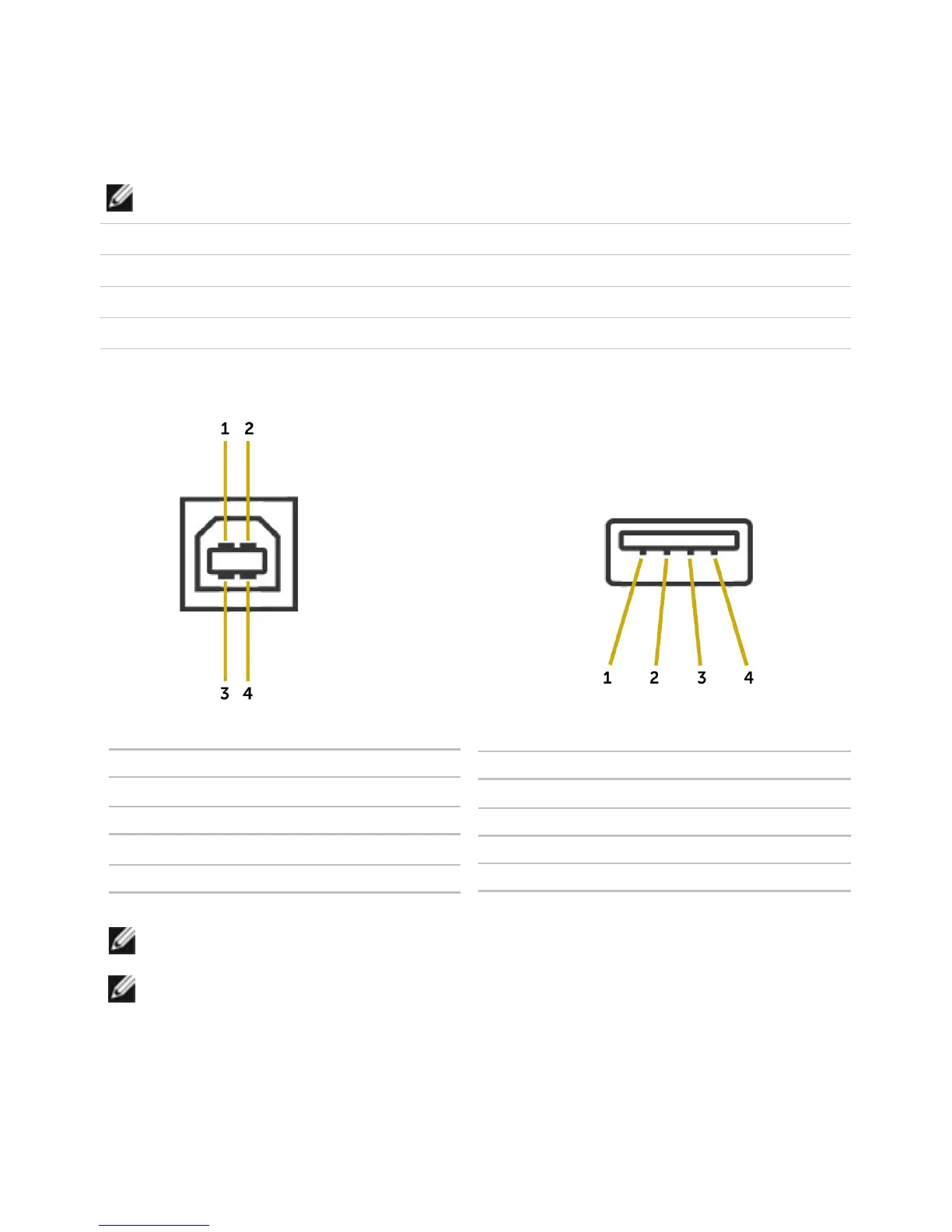
USB Upstream port USB Downstream port
Pin Number Signal name
1 DMU
2 VCC
3 DPU
4 GND
Pin Number Signal name
1 VCC
2 DMD
3 DPD
4 GND
NOTE: USB 2.0 functionality requires a USB 2.0-capable computer.
NOTE: The monitor’s USB ports work only when the monitor is on or in the power
save mode. If you turn o the monitor and then turn it on, the attached peripher-
als may take a few seconds to resume normal functionality.



 To Next Page