About Your Monitor 13
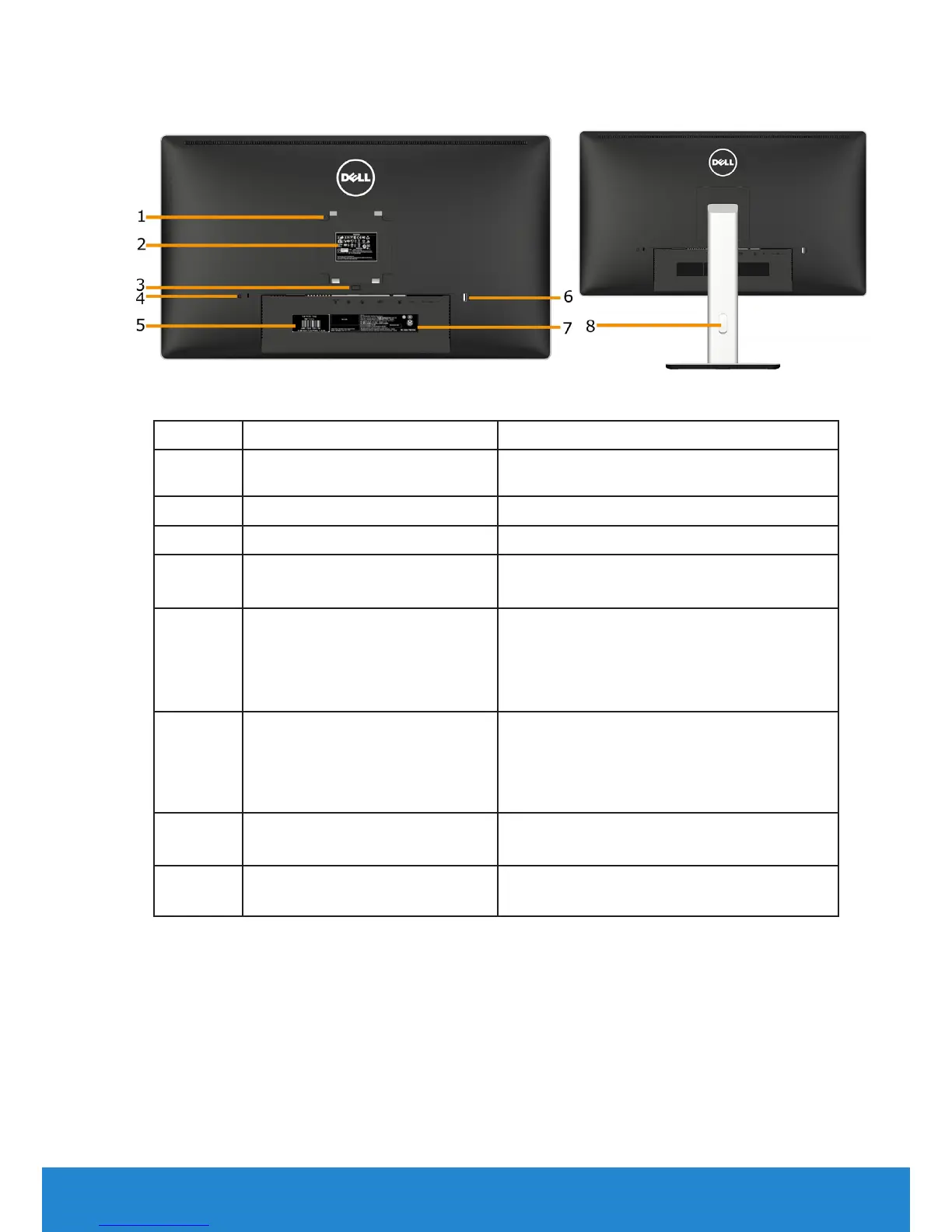
Back View
Back View with monitor stand
Label Description Use
1 VESA mounting holes (100
mm)
To mount the monitor.
2 Regulatory rating label Lists the regulatory approvals.
3 Stand release button Release stand from monitor.
4 Security lock slot
Use a security lock to secure your
monitor. (security lock not included).
5 Service Tag Label The Dell service tag is used for Dell
warranty and customer service
management purposes and for records
of the base system.
6 USB downstream port Connect your USB devices.This USB
port supports BC 1.2 compliance
charging devices, at 1.5A max for fast
charging.
7 Barcode serial number label Refer to this label if you need to
contact Dell for technical support.
8 Cable management slot Use to organize cables by placing them
through the slot.


 To Next Page