Operating the Monitor 43
DisplayPort
1.2
Press the key to enable or disable DisplayPort 1.2. To use
the DP MST (Daisy Chain) feature, enable DP 1.2.
NOTE: Ensure your graphics card can support these
features before selecting DP 1.2. Wrong setting may result
in blank screen. Some graphics card do not support MCCS
(Monitor Control Command Set) at DP 1.2. In these cases,
DDM (Dell Display Manager) may not run.
DisplayPort 1.2 is disabled when input source is HDMI.
Reset Display
Settings
Select this option to restore default display settings.
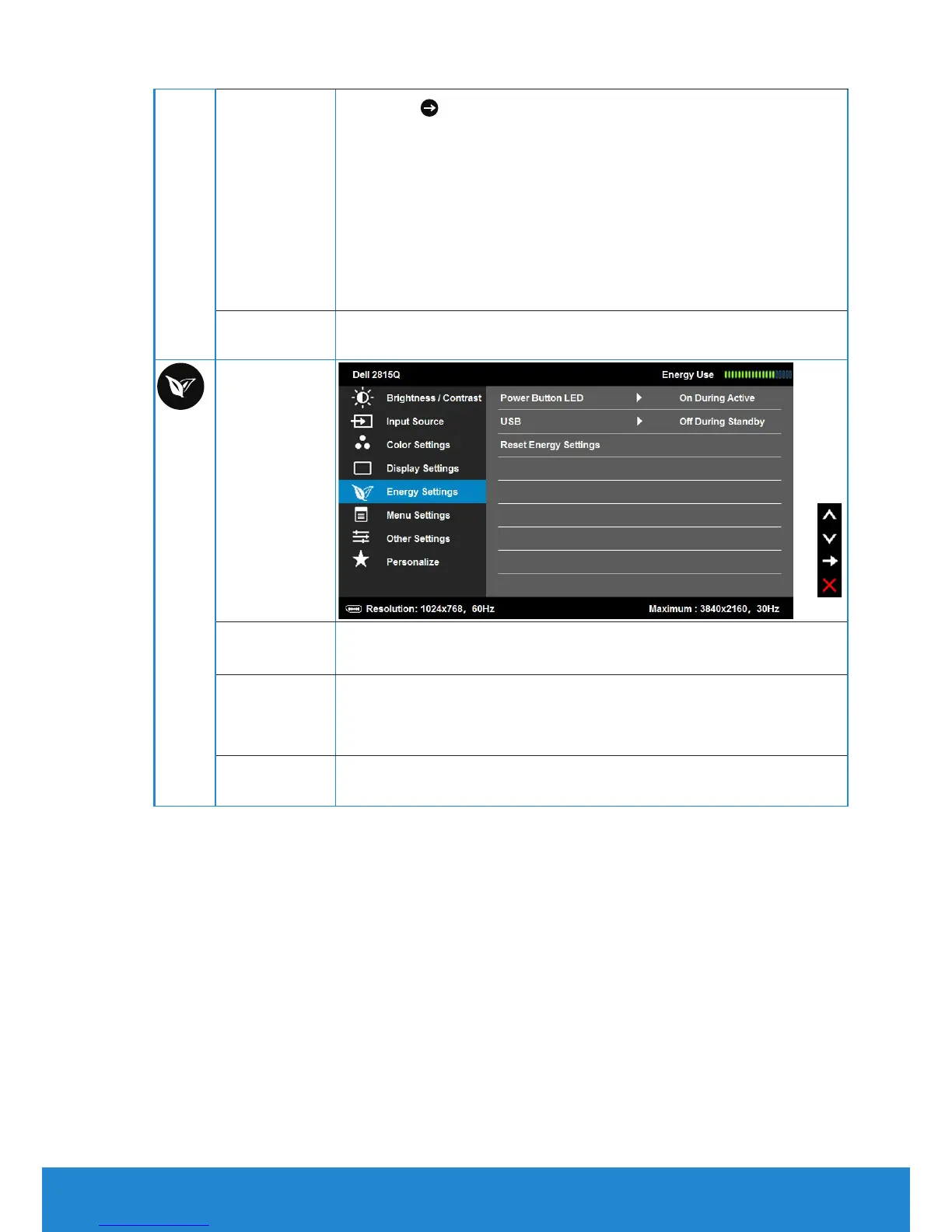
Energy
Settings
Power Button
LED
Allows you to set the power LED indicator on or o to save
energy.
USB
By turning on or o to control USB power supply while
monitor under standby mode but without USB upstream
cable .
Reset Energy
Settings
Select this option to restore default Energy Settings.


 To Next Page