4 Insert the SIM card tray into the slot.
B
Base cover
Removing base cover
1 Follow the procedure in Before working inside your computer.
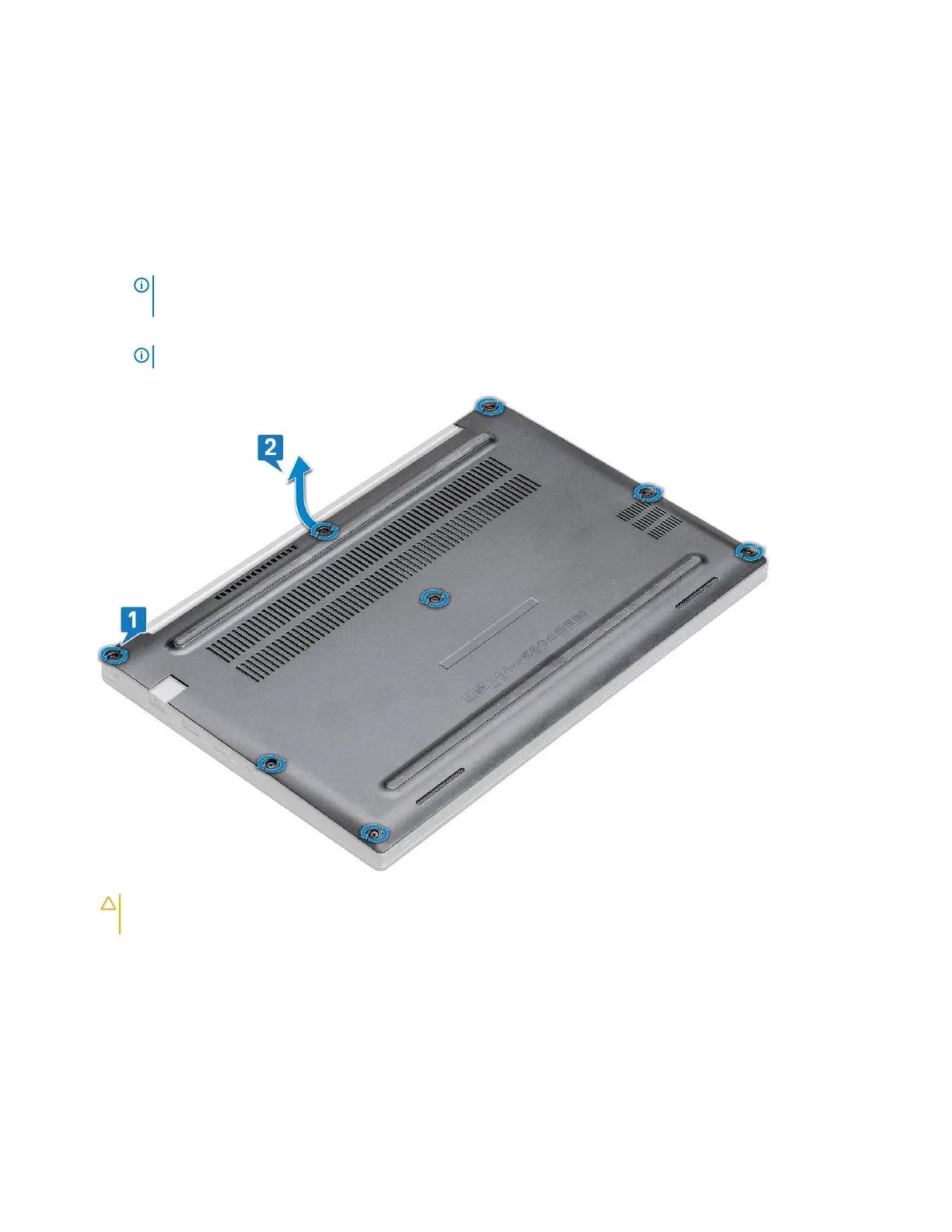
2 To release the base cover:
a Loosen the M2.5 x 6 captive screws (8) that secure the base cover to the computer [1].
NOTE: Exercise caution when loosening the screws. Angle the screwdriver to match the head of the front corners of
screw, to avoid a possible stripped screw head.
b Use a plastic scribe to release the base cover from the edge and lift it from the computer [2].
NOTE: Pry the edges starting from SIM card tray button clockwise.
CAUTION: Exercise caution when loosening the screws. Angle the screwdriver to match the head of the screw (front
corners on the laptop base cover) to avoid a possible stripped screw head.
3 Lift the base cover from the computer.
Removing and installing components 9



 To Next Page