22 | About Your Monitor
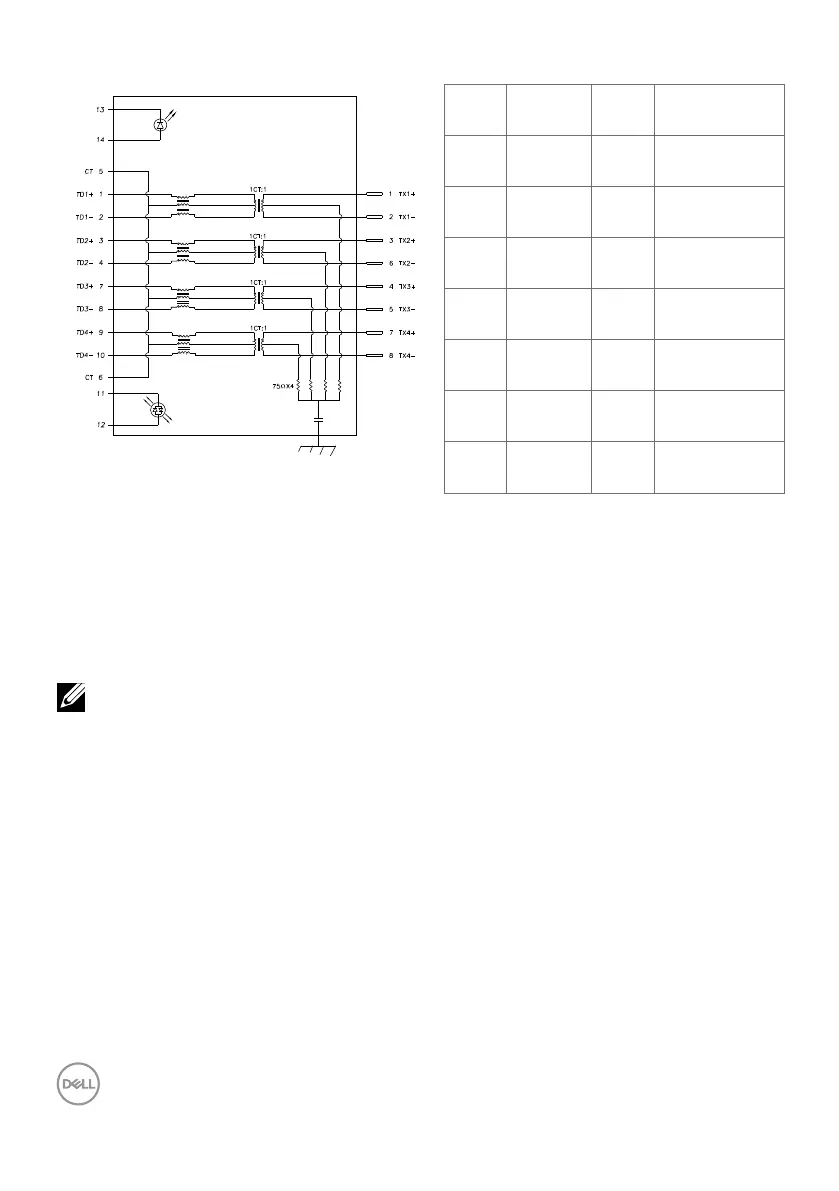
RJ45 Port (Connector Side)
PHY SIDE
CABLE SIDE
RJ45
GREEN
GREEN
ORANGE
SHIELD
GROUND
2kV, 1000pF
Pin Signal Pin Signal
1 TD1 + 8 TD3 -
2 TD1 - 9 TD4 +
3 TD2 + 10 TD4 -
4 TD2 - 11 GREEN_OR-
ANGE
5 CT 12 GREEN_OR-
ANGE
6 CT 13 GREEN
7 TD3 + 14 GREEN
Driver Installation
Install the Realtek USB GBE Ethernet Controller Driver available for your system. This
is available for download at https://www.dell.com/support under the “Driver and
download” section.
Network (RJ45) data rate via USB-C max speed is 1000 Mbps.
NOTE: This LAN port is 1000Base-T IEEE 802.3az compliant, supporting
Mac Address (Printed on model label) Pass-thru (MAPT), Wake-on-LAN
(WOL) from standby mode (S3 only) and UEFI*PXE Boot function, these 3
features depend on BIOS setting and OS version.
* UEFI stands for Unified Extensible Firmware Interface.



 To Next Page