30 | Operating your monitor
Using the on-screen display (OSD) menu
Accessing the OSD menu
NOTE: Any changes you make are automatically saved when you move to
another menu, exit the OSD menu, or wait for the OSD menu to automatically
close.
1.
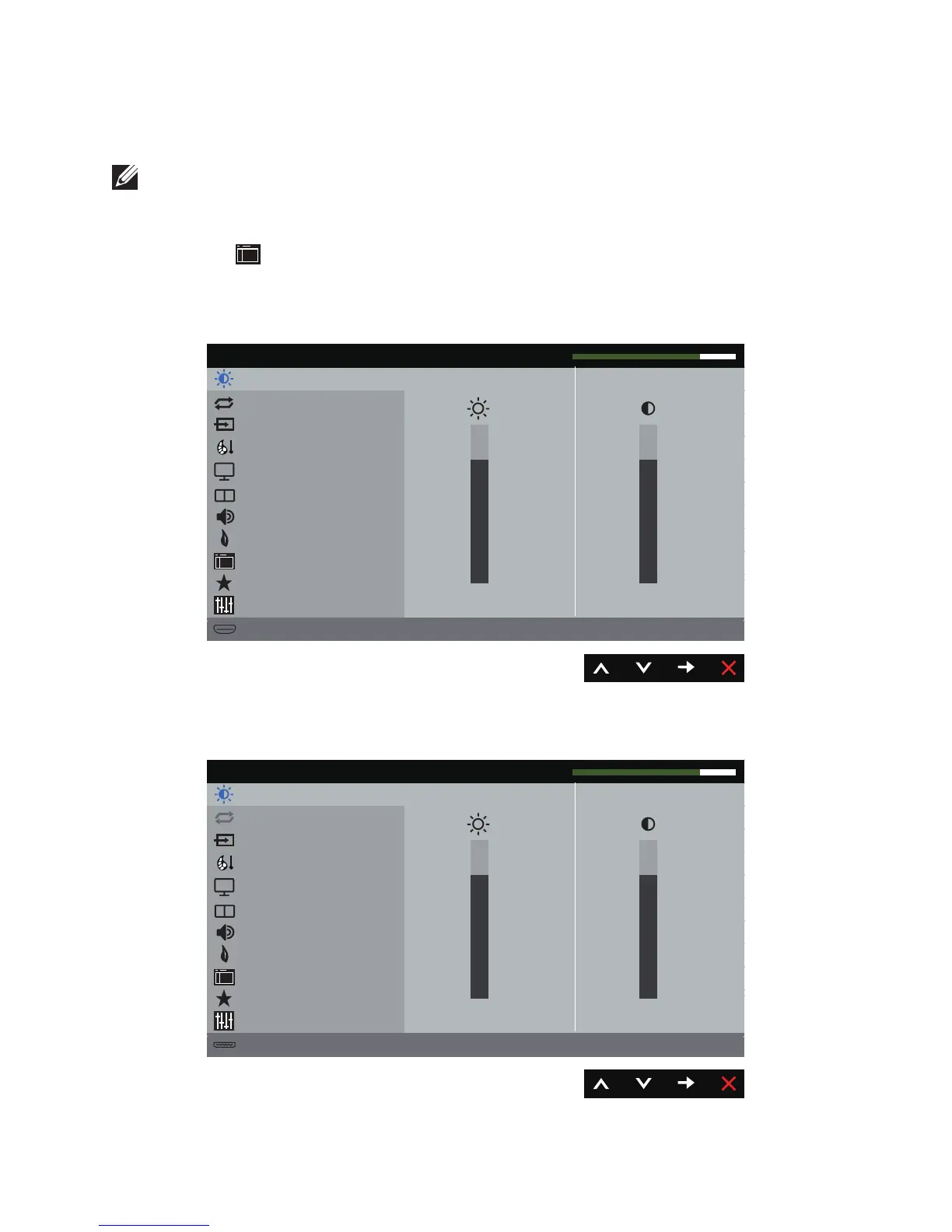
Press the button to display the OSD main menu.
Main menu for analog (VGA) input
Brightness / Contrast
Auto Adjust
Input Source
Color
Display
PIP/PBP
Energy
Menu
Personalize
Others
Resolution: 1920x1080, 50Hz
Dell P4317Q Energy Use
75
5%
Audio
Maximum: 1920x1080, 60Hz
or
Main Menu for digital (HDMI/MHL 1 / HDMI/MHL 2) input
Brightness / Contrast
Auto Adjust
Input Source
Color
Display
PIP/PBP
Energy
Menu
Personalize
Others
Resolution: 1920x1080, 50Hz
Dell P4317Q Energy Use
75


 To Next Page