38 | Operating your monitor
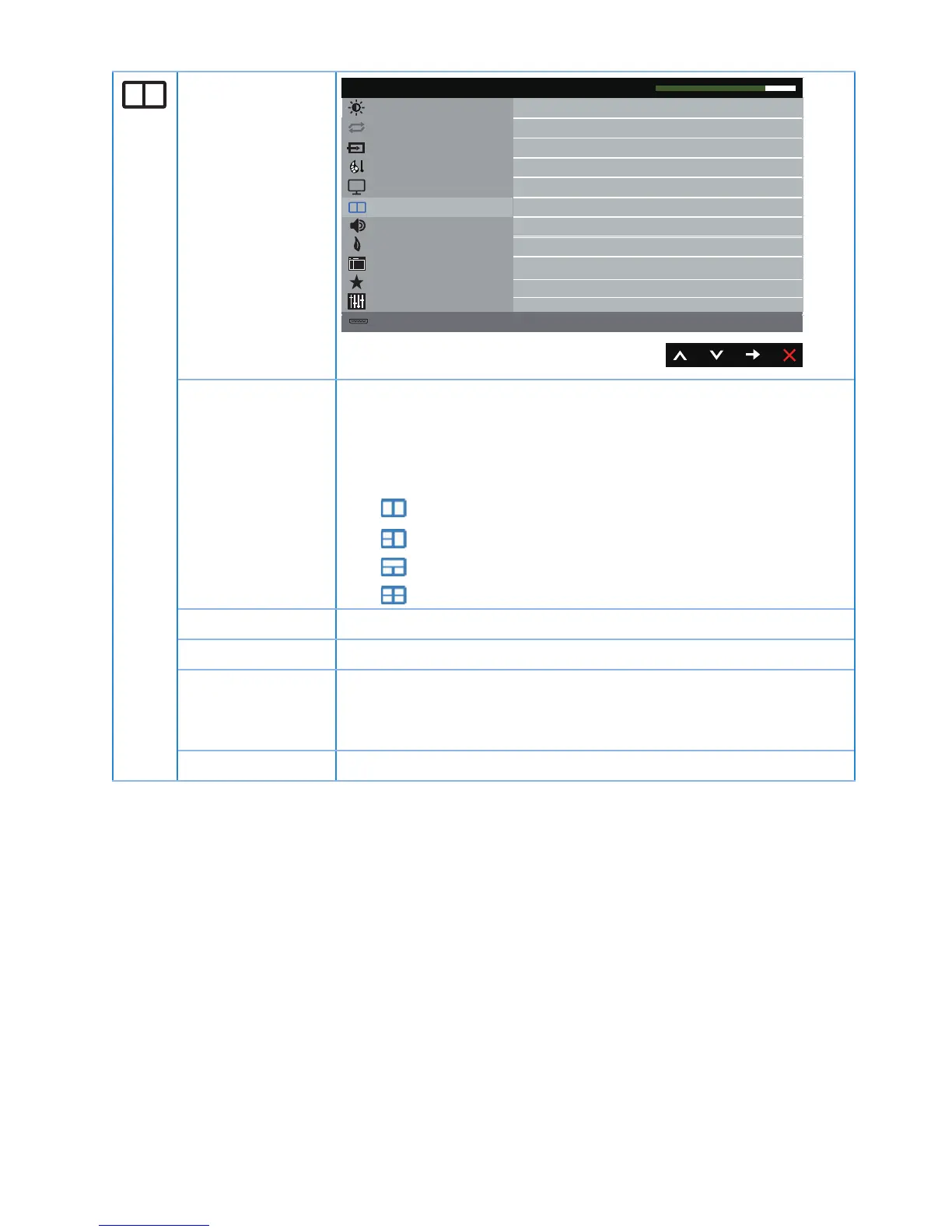
PIP/PBP
Energy
Menu
Personalize
Others
Resolution: 1920x1080, 50Hz
Dell P4317Q Energy Use
Audio
Maximum: 3840x2160, 30Hz
Brightness / Contrast
Input Source
Color
Off
PIP/PBP Mode
PIP/PBP
Display
Auto Adjust
PIP/PBP Mode There are five modes: Picture in Picture (PIP) and Picture by
Picture (PBP) with 2/3/4 widnows.
Off: Normal display mode
PIP: PIP 2 window
PBP : PBP 2 window
PBP : PBP 3 window mode1
PBP : PBP 3 window mode2
PBP : PBP 4 window
PIP/PBP Source Select PIP or PBP source.
PIP Size Select the PIP window of small or large.
PIP Position Select PIP sub-window position.
Use or to browse and or select top-left, top-right, bottom-
right or bottom-left.
PBP Size Select the PBP window of aspect ratio or fill.


 To Next Page