Operating your monitor | 41
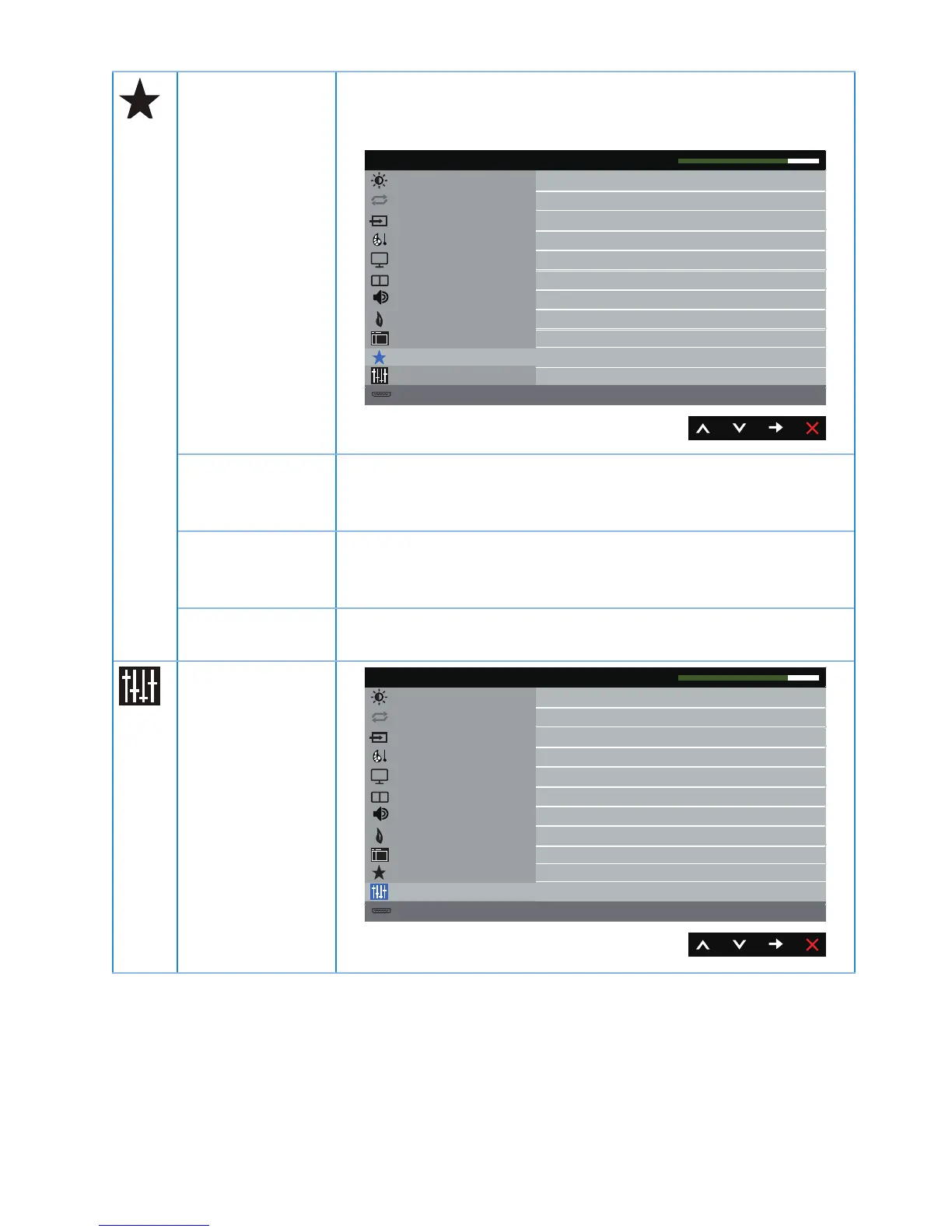
Personalize Users can choose a feature from shortcut key 1, shortcut
key 2, reset personalization, preset modes or volume and
set it as a shortcut key.
Others
Resolution: 1920x1080, 50Hz
Dell P4317Q Energy Use
Maximum: 3840x2160, 30Hz
Brightness / Contrast
Input Source
Color
Display
PIP/PBP
Audio
Energy
Menu
Personalize
Shortcut Key 1Preset Modes
Shortcut Key 2Volume
Reset Personalization
Auto Adjust
Shortcut Key 1 User can select one of the following: preset modes,
brightness/contrast, auto adjust, input source, aspect ratio,
PIP/PBP mode, volume to set the shortcut key 1.
Shortcut Key 2 User can select one of the following: preset modes,
brightness/contrast, auto adjust, input source, aspect ratio,
PIP/PBP mode, volume to set the shortcut key 2.
Reset
Personalization
Allows you to restore shortcut key to the default setting.
Others
Resolution: 1920x1080, 50Hz
Dell P4317Q Energy Use
Maximum: 3840x2160, 30Hz
Brightness / Contrast
Input Source
Color
Display
PIP/PBP
Audio
Energy
Menu
Personalize
Others
Enable
Disable
DDC/CI
LCD Conditioning
Reset Others
Firmware
Factory Reset
Auto Adjust


 To Next Page