Home
Dell
Computer Hardware
POWEREDGE RAID H700
Page 59
Dell POWEREDGE RAID H700 - Page 59
178 pages
Manual
Save Page as PDF
To Next Page
To Next Page
To Previous Page
To Previous Page
Loading...
Installing and Config
uring Hardware
59
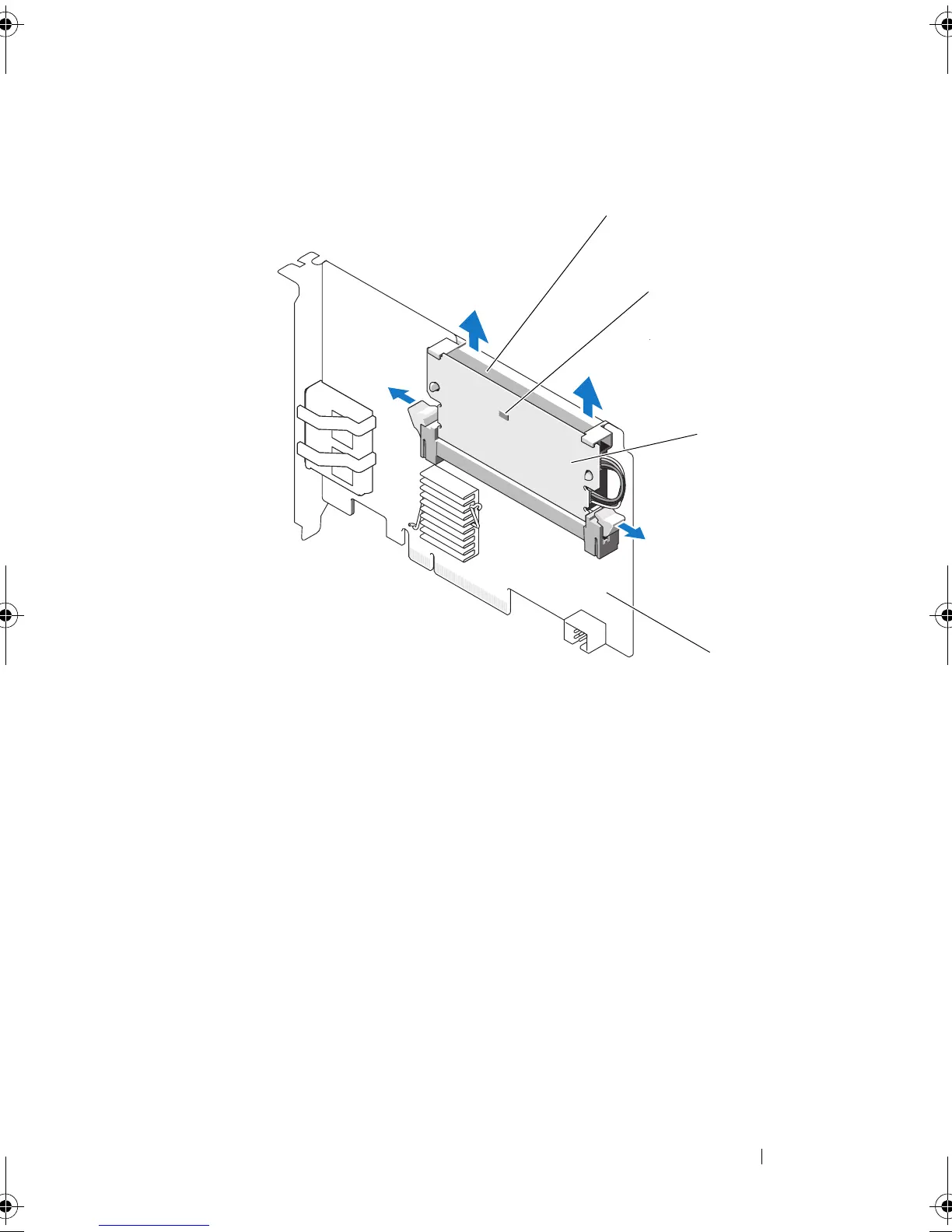
Figure 4-14.
Removing the
TBBU
From a PERC H800 Adapter
1
battery
2
dirty cache LED
3
DIMM
4
PERC H800 Adapter
1
2
4
3
PERC
7.2
_UG.bo
ok Page 59
T
hursd
ay
, March 3,
2011
2:1
4
PM
58
60
Table of Contents
Main Page
Default Chapter
3
Table of Contents
3
1 Safety Instructions
11
General Safety Instructions
11
When Working Inside Your System
12
Protecting against Electrostatic Discharge
12
Battery Disposal
13
2 Overview
15
PERC H700 and H800 Card Descriptions
15
PCI Architecture
16
Operating System Support
16
RAID Description
17
Summary of RAID Levels
17
RAID Terminology
18
Physical Disks
20
3 Storage Controller Features
21
Physical Disk Power Management
24
Using the SMART Feature
24
Initializing Virtual Disks
25
Background Initialization of Virtual Disks
25
Full Initialization of Virtual Disks
25
Fast Initialization of Virtual Disks
26
Consistency Checks
26
Disk Roaming
26
Disk Migration
27
Compatibility with Virtual Disks Created on PERC 6 and H200 Cards
28
Migrating Virtual Disks from PERC 6 or H200 to PERC H700 and H800
28
Virtual Disk Write Cache Policies
29
Write-Back and Write-Through
29
Conditions under Which Write-Back Is Employed
29
Conditions under Which Write-Through Is Employed
30
Conditions under Which Forced Write-Back with no Battery Is Employed
30
Virtual Disk Read Cache Policies
30
Reconfiguring Virtual Disks
31
Fault Tolerance Features
33
Using Persistent Hot Spare Slots
34
Physical Disk Hot Swapping
34
Failed Physical Disk Detection
34
Redundant Path with Load Balancing Support
35
Using Replace Member and Revertible Hot Spares
35
Controller Cache Preservation
36
Cache Preservation with Battery
37
Cache Preservation with Non-Volatile Cache (NVC)
37
Cache Data Recovery
37
Battery Learn Cycle
38
Patrol Read
38
4 Installing and Configuring Hardware
41
Installing the PERC H700 and H800 Adapters
41
Removing the PERC H700 and H800 Adapters
46
Removing and Installing the PERC H700 Modular Card in Dell Blade Systems
49
Removing the DIMM from a PERC H700
51
Installing the DIMM on a PERC H700
53
Replacing the BBU on a PERC H700
56
Removing the TBBU or TNVC from a
58
PERC H800 Adapter
58
Replacing the Battery and Battery Cable Onto
60
The DIMM of a PERC H800 Adapter
60
Installing the TBBU or TNVC on a PERC H800 Adapter
61
Transferring a TBBU or TNVC between PERC H800 Cards
63
Setting up Redundant Path Support on the PERC H800 Adapter
64
Reverting from Redundant Path Support to Single Path Support on the PERC H800 Adapter
67
5 Driver Installation
69
Installing Windows Drivers
69
Creating the Driver Media
69
Pre-Installation Requirements
70
Installing Driver During a Windows Server 2003 Operating System Installation
71
Installing Driver During a Windows Server 2008, Windows Server 2008 R2 Installation
72
Installing Windows Server 2008, Windows Server 2008 R2, Windows Server 2003 for a New RAID Controller
72
Updating Existing Windows Server 2008, Windows Server 2008 R2, Windows Server 2003
73
Installing Linux Driver
74
Installing Red hat Enterprise Linux Operating System Using the DUD
76
Installing SUSE Linux Enterprise Server Using the Driver Update Diskette
77
Installing the RPM Package with DKMS Support
78
Installing Solaris Driver
79
Installing Solaris 10 on a Poweredge System
80
Adding or Updating the Driver to an Existing System
80
6 Configuring and Managing RAID
81
Dell Openmanage Storage Management
81
BIOS Configuration Utility
82
Entering the BIOS Configuration Utility
82
Exiting the Configuration Utility
83
Menu Navigation Controls
83
Setting up Virtual Disks
85
Virtual Disk Management
88
Creating Virtual Disks
88
Initializing Virtual Disks
91
Checking Data Consistency
91
Importing or Clearing Foreign Configurations Using the VD Mgmt Menu
92
Importing or Clearing Foreign Configurations Using the Foreign Configuration View Screen
93
Managing Preserved Cache
96
Managing Dedicated Hot Spares
97
Deleting Virtual Disks
98
Deleting Disk Groups
98
Clearing the Configuration
99
BIOS Configuration Utility Menu Options
99
Physical Disk Management
108
Setting LED Blinking
108
Creating Global Hot Spares
109
Removing Global or Dedicated Hot Spares
109
Replacing an Online Physical Disk
110
Stopping Background Initialization
111
Performing a Manual Rebuild of an Individual Physical Disk
111
Controller Management
112
Enabling Boot Support
112
Enabling BIOS Stop on Error
113
Enabling Auto Import
113
Restoring Factory Default Settings
114
7 Cachecade
115
Cachecade Virtual Disk Characteristics
115
Configuring and Managing Cachecade Virtual Disks
116
Cachecade Virtual Disk Management
116
Create Cachecade Virtual Disk
116
Delete Cachecade Virtual Disk
118
Reconfiguring Cachecade Virtual Disks
118
8 Security Key and RAID Management
121
Security Key Implementation
121
Configuring and Managing Secured Virtual Disks
121
BIOS Configuration Utility Security Menu Options
121
Security Key Management
122
Creating Secured Virtual Disks
125
Securing Pre-Existing Virtual Disks
126
Importing or Clearing Secured Foreign Configurations and Secure Disk Migration
126
Instant Secure Erase
128
Troubleshooting Security Key Errors
128
Secured Foreign Import Errors
128
Failure to Select or Configure Non Self-Encrypting Disks (Non-SED)
129
Failure to Delete Security Key
129
Failure to Instant Secure Erase Task on Physical Disks
129
9 Troubleshooting
131
Post Error Messages
131
Degraded State of Virtual Disks
141
Memory Errors
141
Preserved Cache State
142
General Issues
142
Physical Disk Related Issues
143
Physical Disk Failures and Rebuild Issues
144
SMART Errors
146
Replace Member Errors
147
Linux Operating System Errors
148
Disk Carrier LED Indicators
151
A Regulatory Notices
153
B Corporate Contact Details (Taiwan Only)
155
Glossary
157
Index
175
Related product manuals
Dell POWEREDGE RADI H700
29 pages
Dell PowerEdge S130
47 pages
Dell PowerEdge H730P
101 pages
Dell PowerProtect DM5500
2 pages
Dell ADVANCED PORT REPLICATOR
30 pages
Dell P570
37 pages
Dell PR03X
22 pages
Dell PERC S130
47 pages
Dell Precision R5500
104 pages
Dell Embedded Box PC5000
136 pages
Dell HBA355i
20 pages
Dell 6 series
160 pages















 To Next Page