Image Enhance To enhance image clarity.
NOTE: Image Enhance is only available for Standard, Multimedia, Movie and Game mode.
Reset Color
Settings
Reset your monitor color settings to the factory settings.
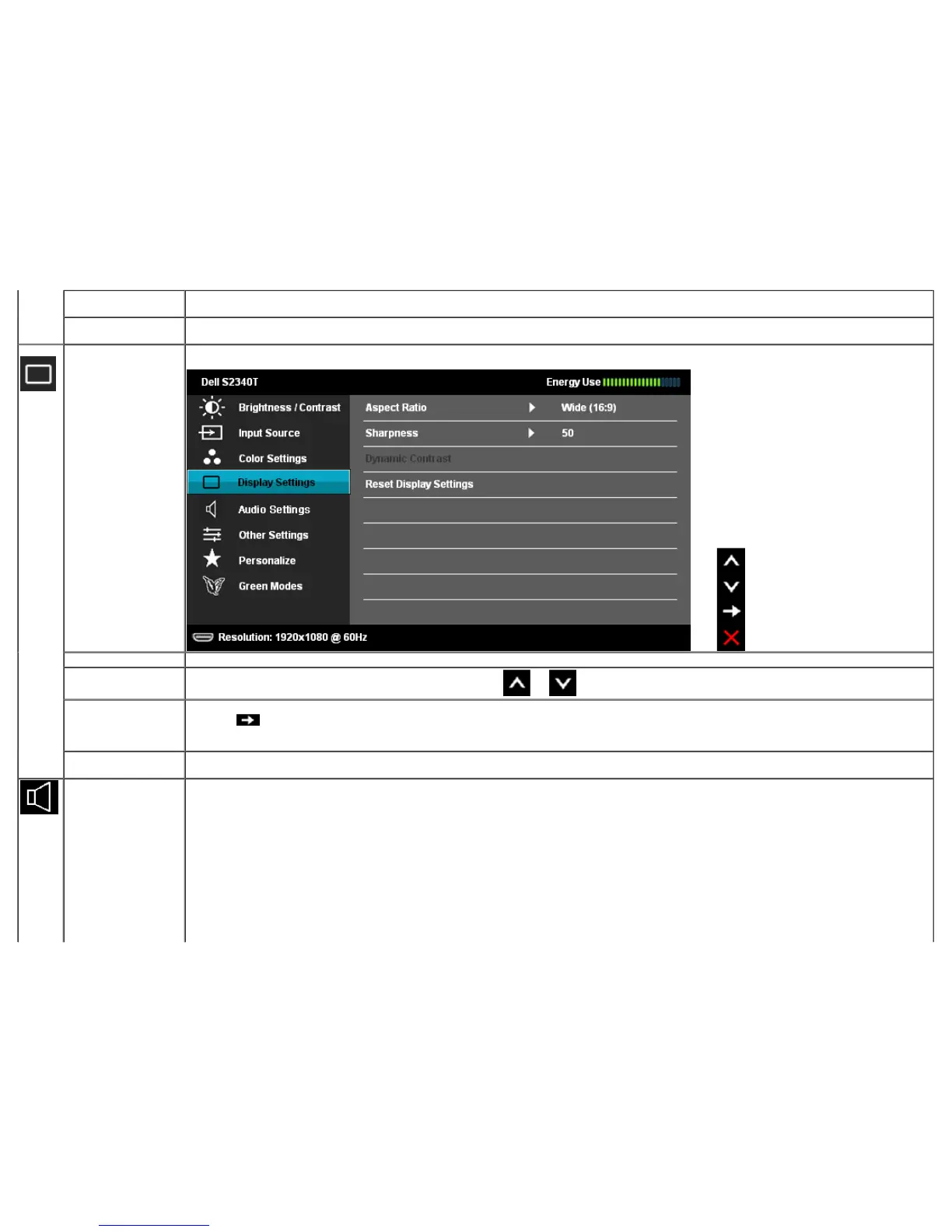
Display Settings Use the Display Settings to adjust image.
Aspect Ratio Adjust the image ratio as wide 16:9, 4:3 or 5:4.
Sharpness
This feature can make the image look sharper or softer. Use or to adjust the sharpness from '0' to '100'.
Dynamic Contrast Dynamic Contrast adjusts the contrast ratio to 8,000,000 : 1.
Push the
button to select the Dynamic Contrast "On" or "Off" .
NOTE: Dynamic Contrast provides higher contrast if you choose Game mode and Movie mode.
Reset Display
Settings
Select this option to restore default display settings.
Audio Settings Use the Audio Settings menu to adjust the audio settings.



 To Next Page