CAUTION—POTENTIAL INJURY: To avoid the risk of fire or electrical shock, connect the power cord to
an appropriately rated and properly grounded electrical outlet that is near the product and easily
accessible.
CAUTION—POTENTIAL INJURY: To avoid the risk of fire or electrical shock, use only the power cord
provided with this product or the manufacturer's authorized replacement.
Warning—Potential Damage: Do not touch the USB cable, any wireless network adapter, or the printer in the
area shown while actively printing. Loss of data or a malfunction can occur.
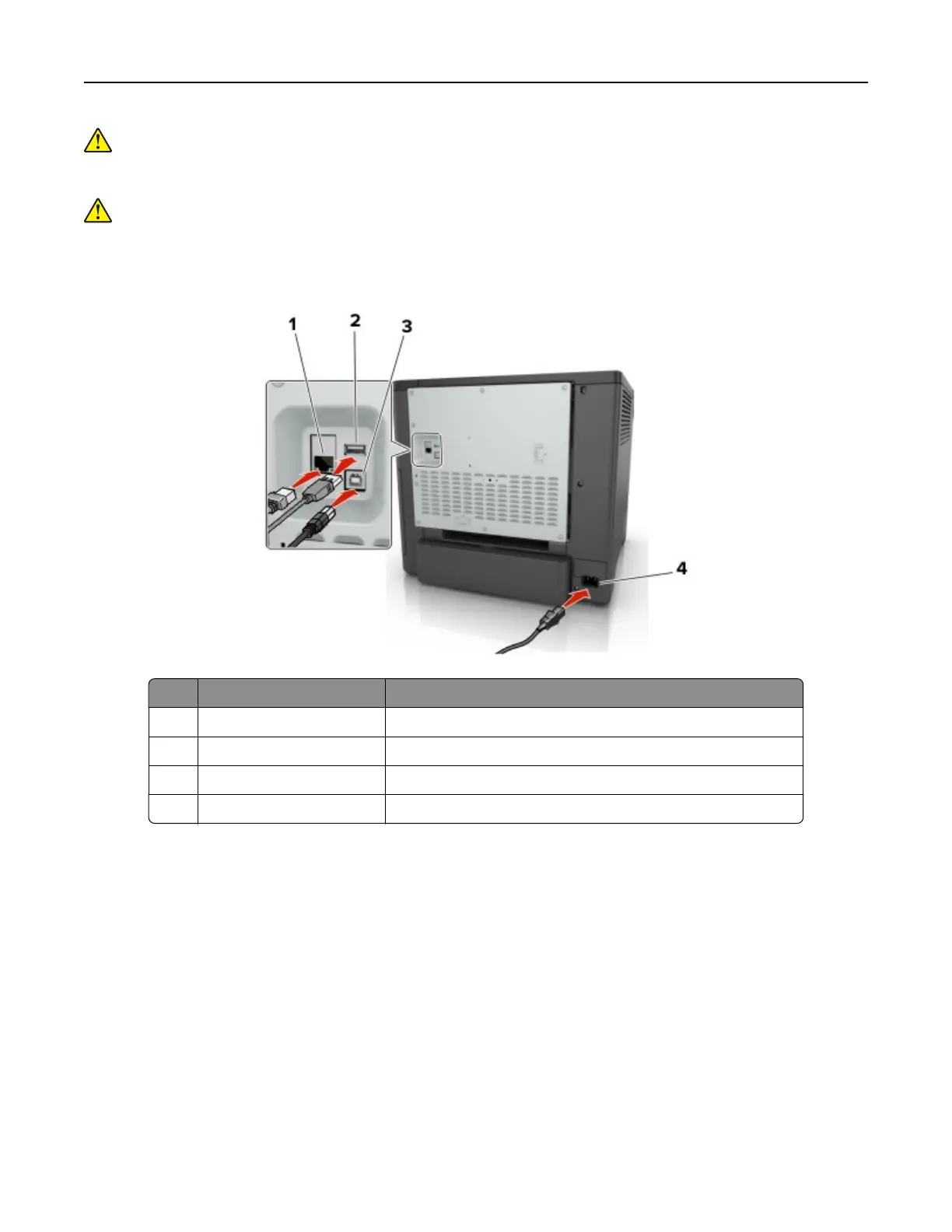
Use the To
1 Ethernet port Connect the printer to a network.
2 USB port Attach a keyboard or any compatible option.
3 USB printer port Connect the printer to a computer.
4 Printer power cord socket Connect the printer to a properly grounded electrical outlet.
Learning about the printer 12



 To Next Page