Item Indicator, Button, or
Connector
Icon Description
7 LCD panel ― Displays system ID, status information, and system
error messages.
• The LCD lights blue during normal storage
controller operation.
• The LCD lights amber when the storage
controller needs attention, and the LCD panel
displays an error code followed by descriptive
text.
NOTE: If the storage controller is connected
to a power source and an error is detected,
the LCD lights amber regardless of whether
the storage controller is turned on or off.
8 Filler plate ― Covers empty bay.
9 vFlash media card slot ― Not used for the SC9000.
10 iDRAC USB Connects USB devices to the system or provides
access to the iDRAC Direct features. The USB
management port is USB 2.0-compliant.
11 Management USB Connects USB devices to the system. The USB
management port is USB 2.0-compliant.
12 Storage Center OS drive An internal SSD drive that holds the Storage Center
OS.
13 Filler plate ― Covers empty bay.
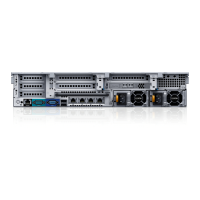
Back Panel Features and Indicators
The back panel of the storage controller contains IO card slots, a system identification button,
connectors, and power supplies.
Figure 2. Back Panel Features and Indicators
About the SC9000
7





 To Next Page
