8 | About Your Monitor
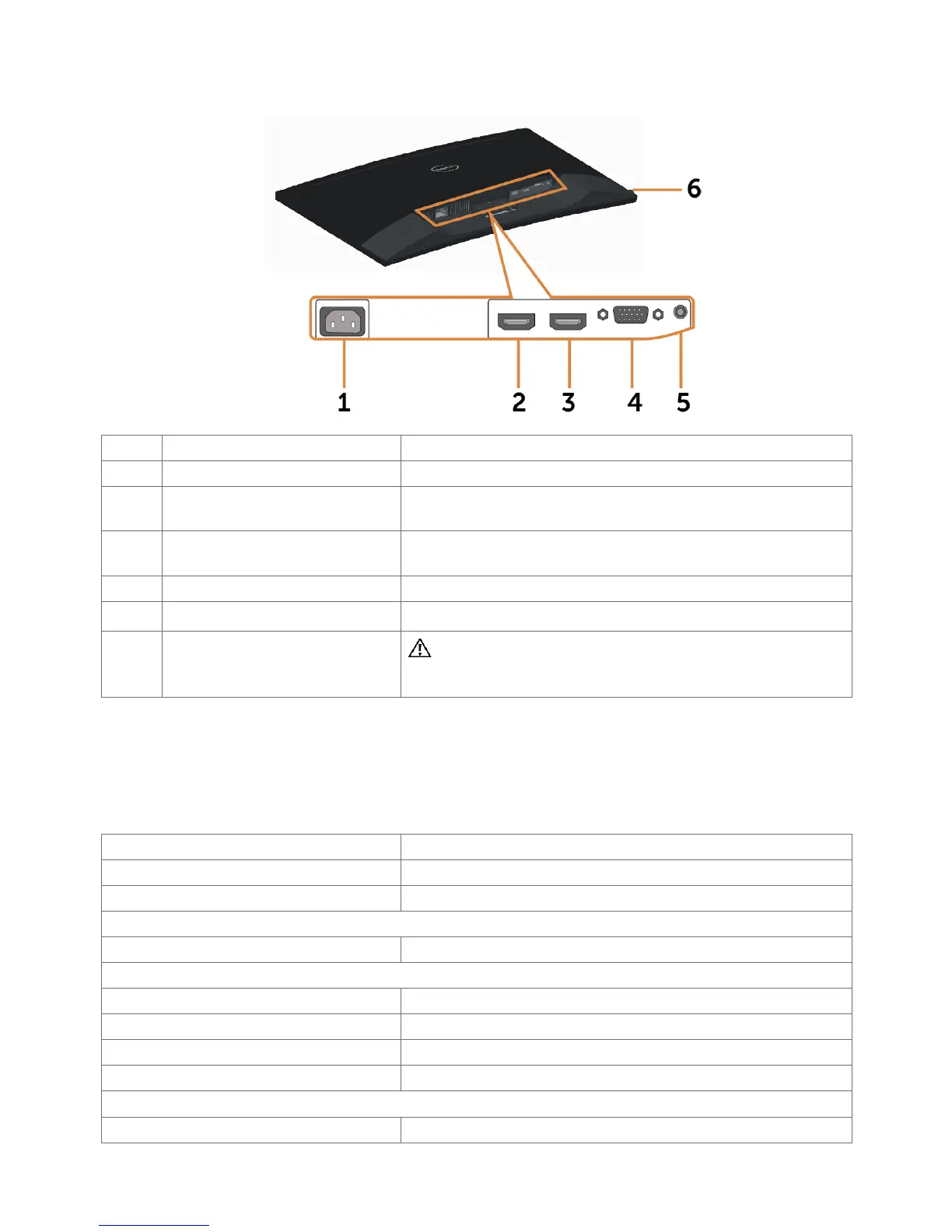
Bottom View
Label Description Use
1 AC power connector To connect the monitor power cable.
2 HDMI (MHL) 1 port Connect your computer with HDMI cable or
portable device with MHL cable.
3 HDMI (MHL) 2 port Connect your computer with HDMI cable or
portable device with MHL cable.
4 VGA port Connect your computer with VGA cable (optional).
5 Audio-in port Connect to your computer audio output (optional).
6 Headphone port
WARNING: Excessive sound pressure from
earphones or headphones can cause hearing
damage or loss.
Monitor Specifications
Flat Panel Specifications
Screen type Active matrix - TFT LCD
Panel type Vertical Alignment
Panel curvature 4000 mm radius
Viewable image:
Diagonal 68.58 cm (27 inches)
Active Area:
Horizontal 597.36 mm (23.52 inches)
Vertical 336.31 mm (13.24 inches)
Area 200898.14 mm
2
(311.40inch
2
)
Pixel pitch 0.3114 mm x 0.3114 mm
Viewing angle:
Horizontal 178° (typical)


 To Next Page