About your monitor │ 13
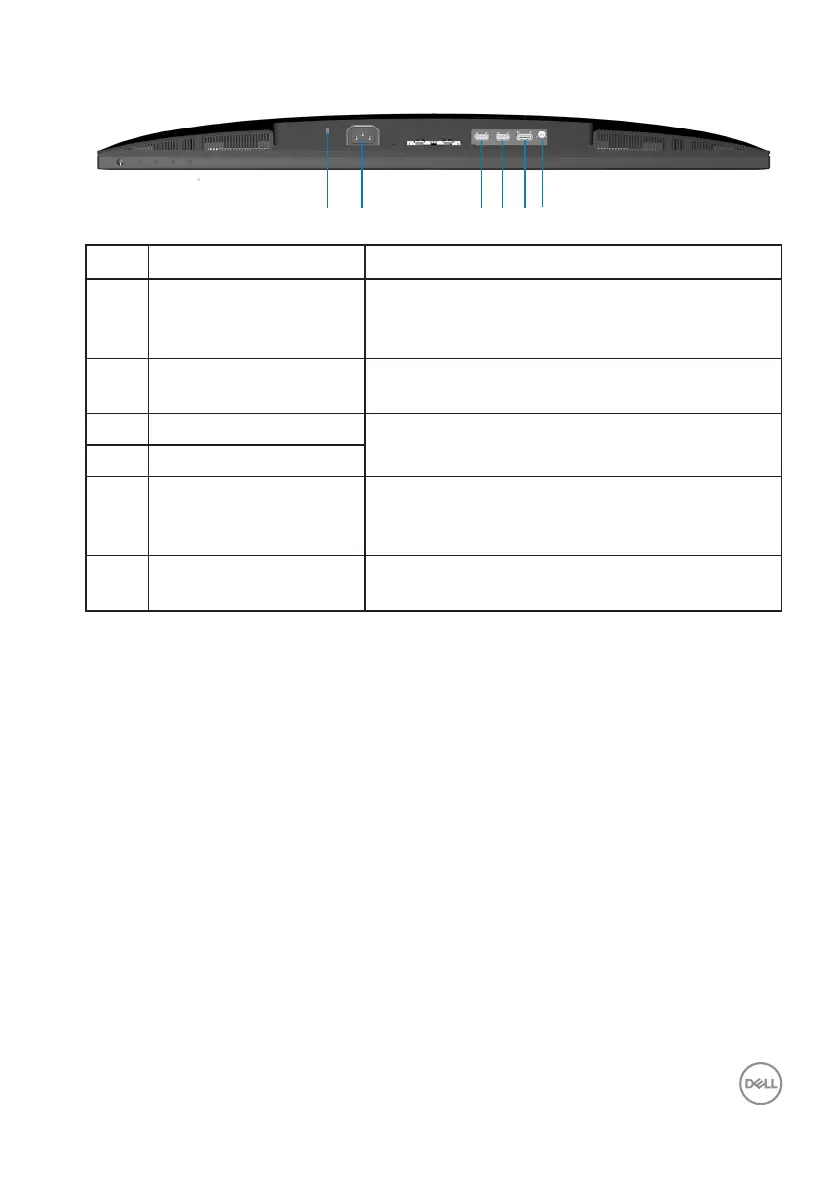
Bottom view
2
1 3 4 5 6
Label Description Use
1 Security-lock slot (based
on Kensington Security
Slot)
Secure your monitor using a security lock
(purchased separately) to prevent unauthorized
movement of your monitor.
2 Power connector Connect the power cable (shipped with your
monitor).
3 HDMI 2.0 port (HDMI 1) Connect to your computer or external device
using a HDMI cable (shipped with your monitor).
4 HDMI 2.0 port (HDMI 2)
5 DisplayPort 1.2 Connect to your computer or external
device using a DisplayPort cable (purchased
separately).
6 Audio line-out port Connect to an external speaker (purchased
separately).*
*Audio line-out port does not support headsets.


 To Next Page