Operating your monitor │ 43
Icon Menu and
Submenus
Description
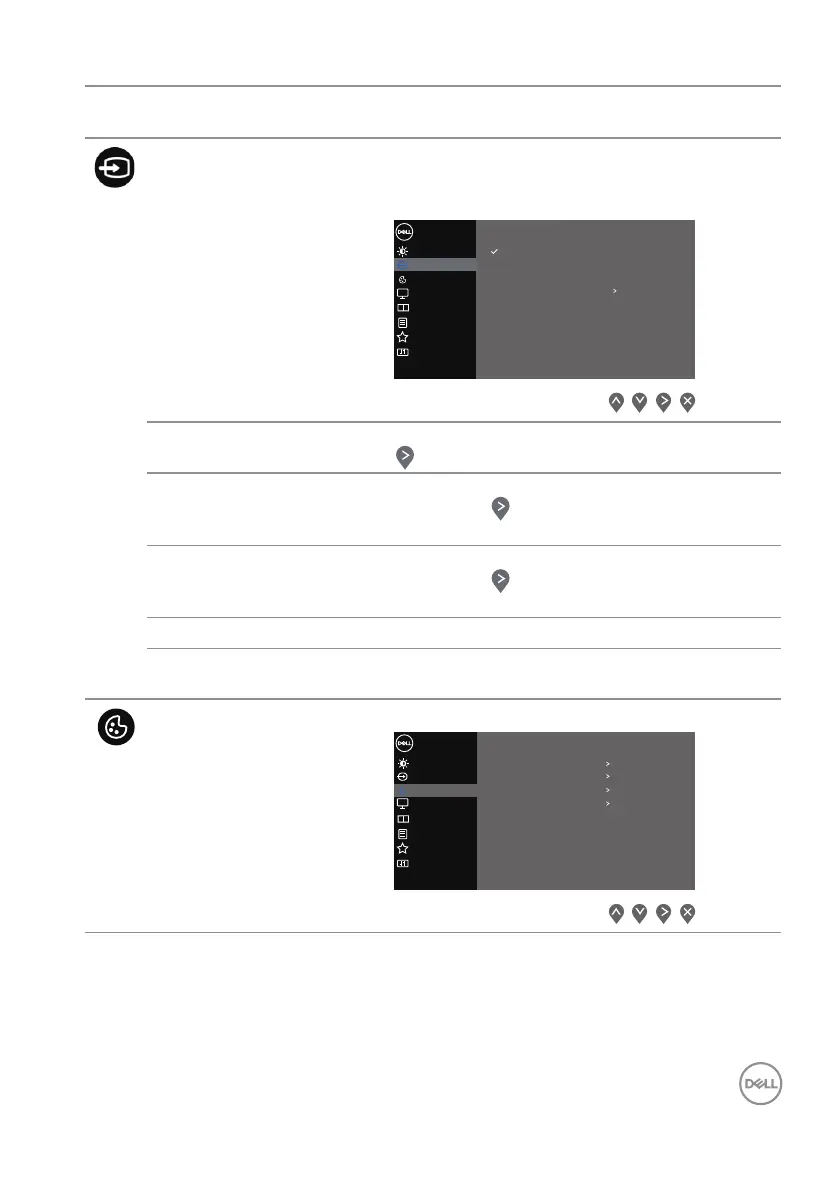
Input Source Uses the Input Source menu to select between the
different video signals that may be connected to your
monitor.
Input Source
Color
Display
Brightness / Contrast
Dell 32 Monitor
Input Source
HDMI 1
DP
Auto Select
On
HDMI 2
Reset Input Source
Others
Personalize
Menu
PIP/PBP
DP Selects DP input when you are using the DP connector.
Press the button to select the DP input source.
HDMI 1 Selects HDMI 1 input when you are using the HDMI 1
connector. Press the button to select the HDMI 1
input source.
HDMI 2 Selects HDMI 2 input when you are using the HDMI 2
connector. Press the button to select the HDMI 2
input source.
Auto Select Choose Auto Select to scan for available input signals.
Reset Input
Source
Select this option to restore default Input Source.
Color Use Color to adjust the color setting mode.
Input Source
Display
Color
Brightness / Contrast
Dell 32 Monitor
Others
Personalize
Menu
PIP/PBP
Preset Modes
Input Color Format
Hue
Saturation
Reset Color
RGB
Standard
50
50


 To Next Page