48 │ Operating your monitor
Icon Menu and
Submenus
Description
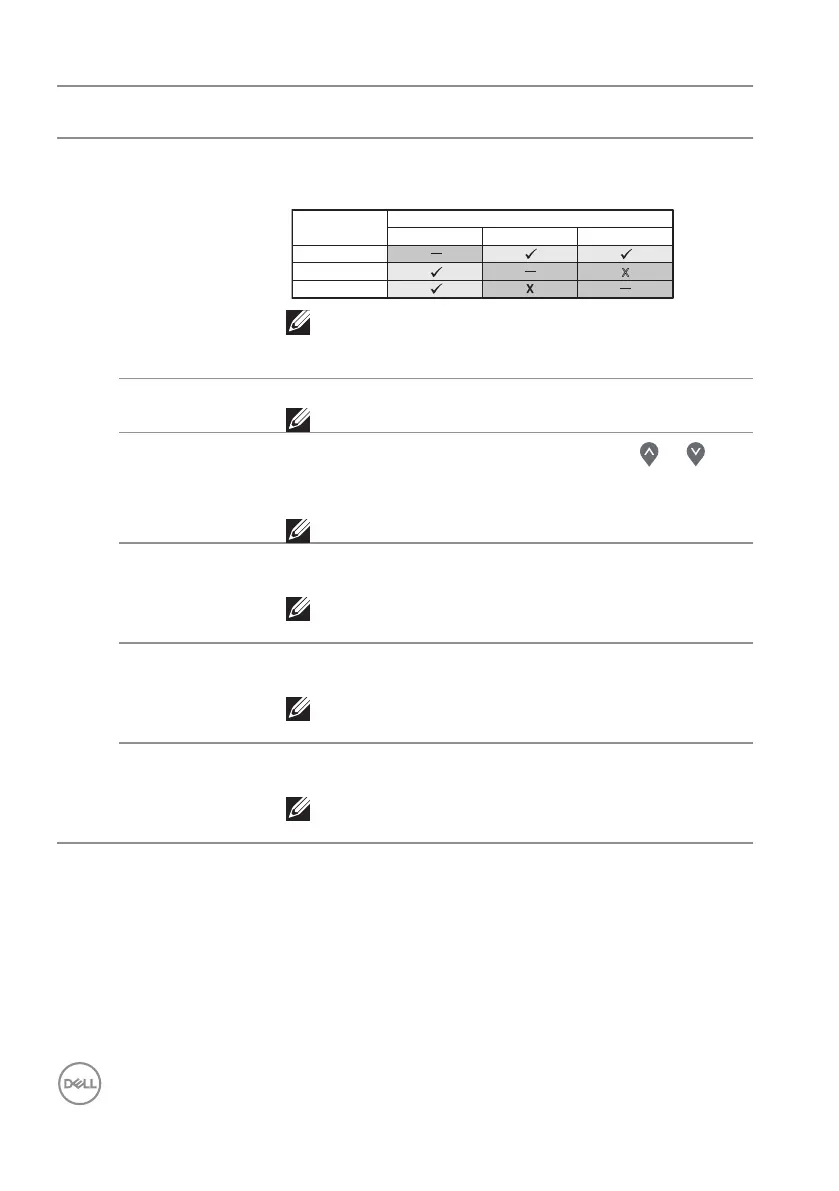
PIP/PBP (Sub) Selects between DP, HDMI 1 or HDMI 2 video signals
that may be connected to your monitor for the PIP/
PBP sub-window.
Sub-Window
Main Window
DP
HDMI 1
DP
HDMI 1
HDMI 2
HDMI 2
X
NOTE: When either HDMI 1 or HDMI 2 is selected
as the main video signal, then PIP/PBP sub-
window will display video only from a DP source.
PIP Size Selects the PIP window size of Small or Large.
NOTE: Only applicable when user turns on PIP.
PIP Location
Selects PIP sub-window location. Use the or
button to select Top-Left, Top-Right, Bottom-
Right, or Bottom-left.
NOTE: Only applicable when you turn on PIP.
Video Swap Allows you to swap videos between main window and
sub-window in PIP/PBP mode.
NOTE: Only applicable when you turn on PIP/
PBP.
Audio Allows you to set the audio line out port source from
the main window or the sub-window.
NOTE: Only applicable when you turn on PIP/
PBP.
Contrast (Sub) Adjusts the contrast level of the picture in PIP/PBP
mode.
NOTE: Only applicable when you turn on PIP/
PBP.


 To Next Page