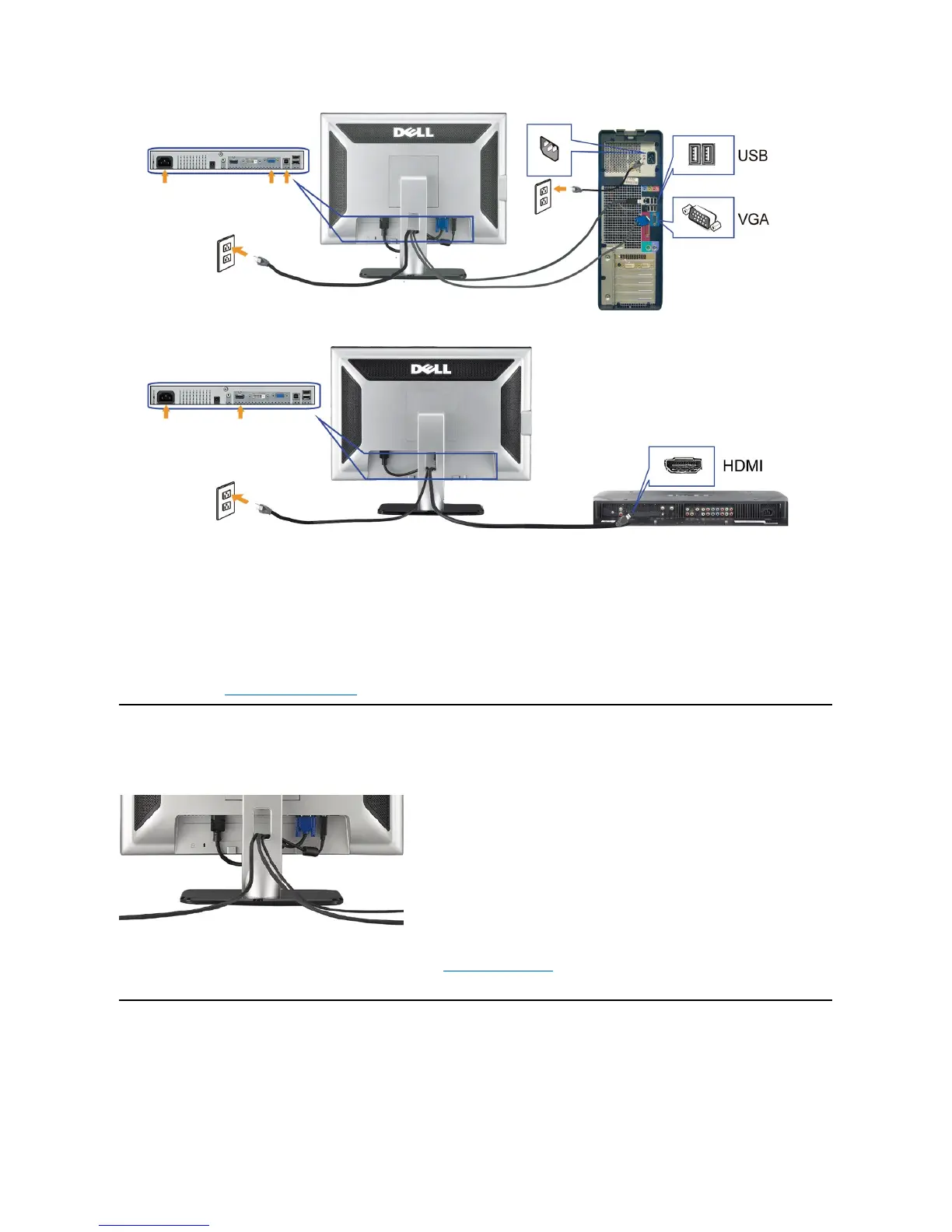
Connecting the HDMI Cable
Organizing The Cables
After attaching all necessary cables to your monitor and computer, (See Connecting Your Monitor for cable attachment,) use the cable management hole
toorganizeallcablesasshownabove.
Attaching the Soundbar
Turn off your computer and disconnect the power cable.
Connect either the white DVI or the blue VGA cable to the connectors on the computer and the monitor, or connect the HDMI to external DVD-player, set-
Connect the USB cable that was included with your monitor to the computer and the upstream USB connector on the monitor. Once this cable is connected to the
computer and the monitor, you can use the USB connectors on the monitor.
ConnectanyUSBdevices.
Connect the power cables.
Turn on your monitor and computer. If you do not see an image, push the input select button and ensure the correct input source is selected. If you still do not
see an image, see Troubleshooting your monitor.



 To Next Page