EasyManua.ls Logo

Dell ST2220 - Personalize Shortcut Keys

Dell ST2220
29 pages
Print Icon
To Next Page IconTo Next Page
To Previous Page IconTo Previous Page
Loading...
OSD Warning Messages
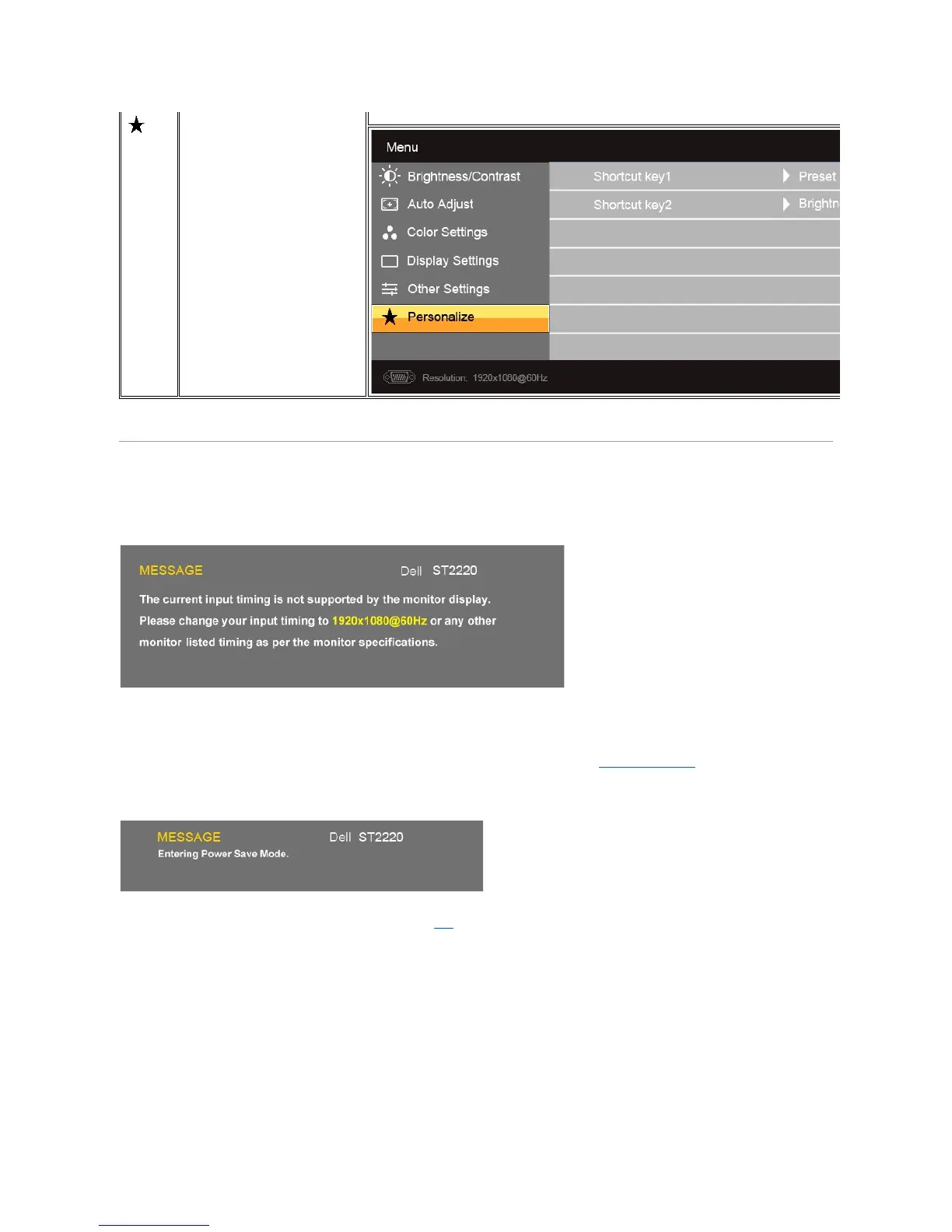
Personalize
There are 2 shortcut keys on the front panel. Select one control menu for each shortcut key to allow direct access.
When the monitor does not support a particular resolution mode you will see the following message :
This means that the monitor cannot synchronize with the signal that it is receiving from the computer. See Monitor Specifications for the
HorizontalandVerticalfrequencyrangesaddressablebythismonitor.Therecommendedmodeis1920x1080.
WhenmonitorentersPowerSavemode,thefollowingmessageappears:
Activate the computer and wake up the monitor to gain access to the OSD
If you press any button other than the power button the following message will appear:

Other manuals for Dell ST2220

Related product manuals