32 Understanding Your Dell Streak 7 Tablet
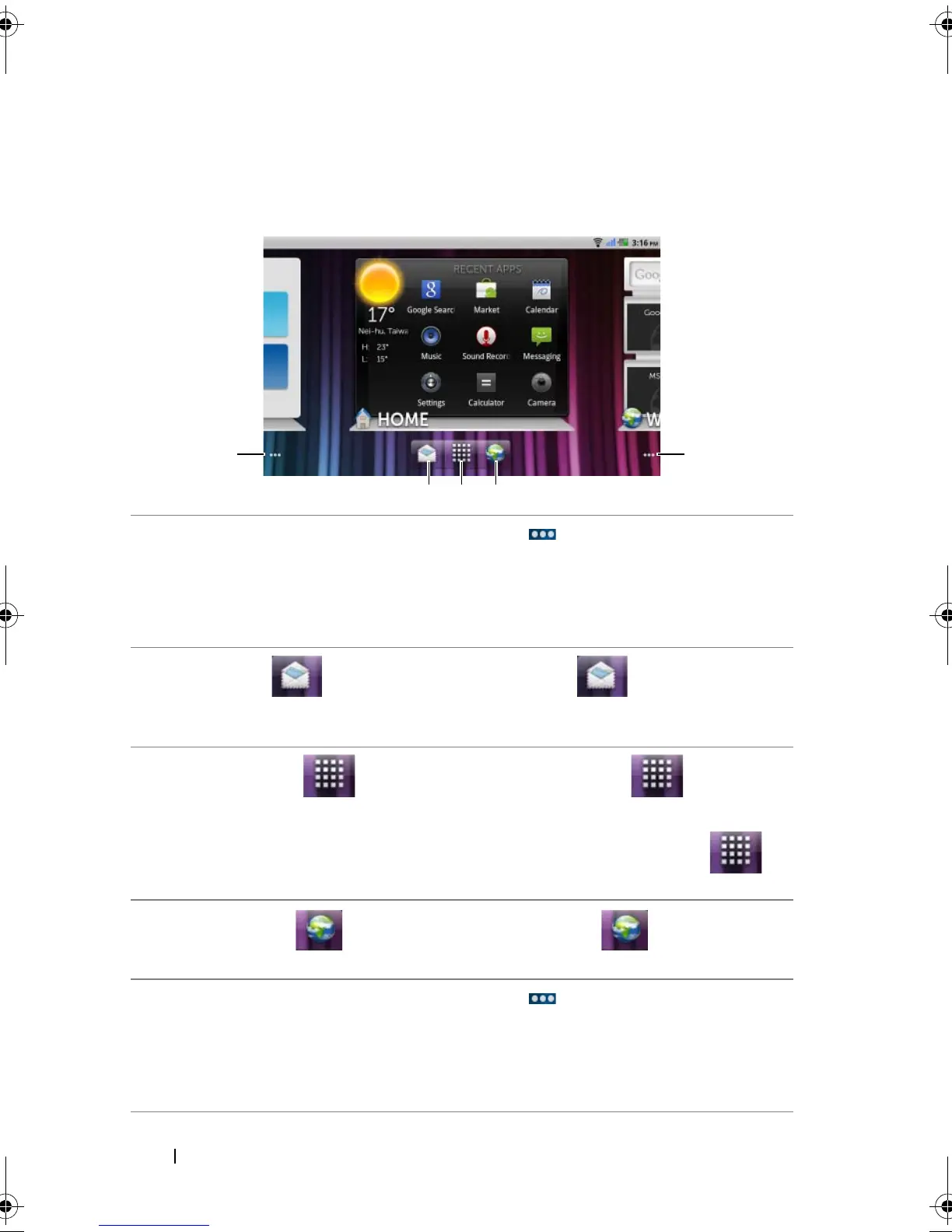
Quick Buttons
The quick buttons at the bottom of the Home screen allow you to
quickly access the application drawer and some main functions.
1 Home screen dots
• Touch the dots
at the bottom left of the
screen to display the Home screen
thumbnails.
• Double-tap the dots at the bottom left of the
screen to move to the first Home screen.
2 Email button Touch the Email button to open the Email
application. For more information on using Email,
see "E-mail" on page 65.
3 Launcher button • Touch the Launcher button to display
the application drawer.
• Touch and hold the Launcher button to
display the Home screen thumbnails.
4 Browser button Touch the Browser button to open the
Browser application.
5 Home screen dots
• Touch the dots
at the bottom right of the
screen to display the Home screen
thumbnails.
• Double-tap the dots at the bottom right of the
screen to move to the last Home screen.
LG7_bk0.book Page 32 Thursday, January 27, 2011 2:16 PM



 To Next Page