Internet 77
Your Gmail inbox opens as the default Gmail view. All your received e-
mails are delivered to your inbox.
To refresh Gmail
Touch the Menu button Refresh to send or receive e-mails and to
synchronize your e-mails with your Gmail account on the Internet.
To view e-mails in different folders or with labels
To view e-mails stored in the folders other than the inbox, such as in
the Sent or All Mail folders, or to view labeled or starred e-mails:
1 Touch the Menu button Go to labels.
2 Touch the folder that stores the e-mails you want to view, or
touch the label with which the e-mails are marked.
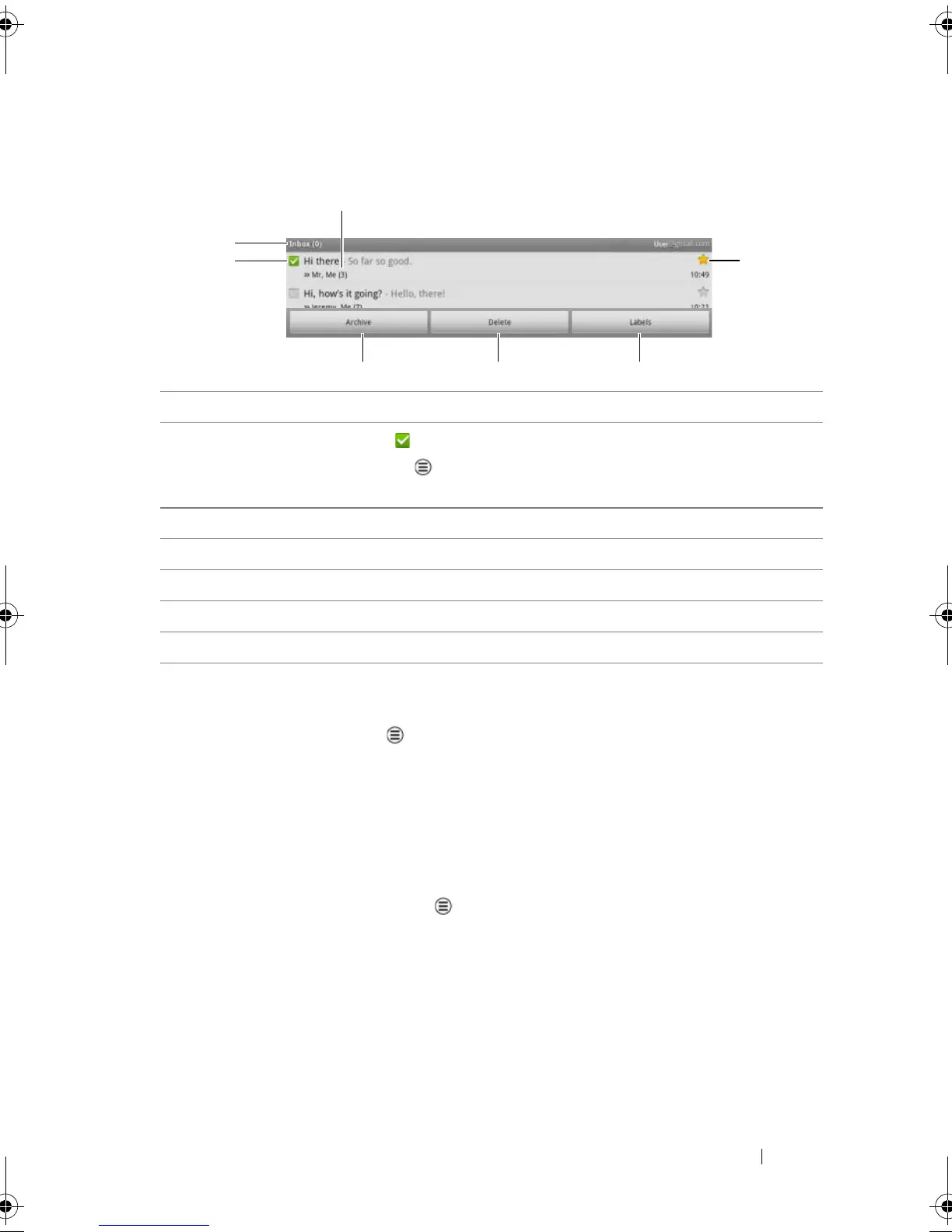
1 Folder (or Label) and number of unread e-mails.
2 Touch the check box to select the e-mail thread. To use this feature,
touch the Menu button
More Settings, then enableBatch
operations.
3 Touch Archive to store the selected e-mail thread in the All Mail folder.
4 Touch Delete to delete the selected e-mail thread.
5 Touch Labels to label the selected e-mail thread.
6 Starred e-mail. Touch the star to add or remove the star.
7 The number of e-mails grouped under the same subject.
LG7_bk0.book Page 77 Thursday, January 27, 2011 2:16 PM



 To Next Page