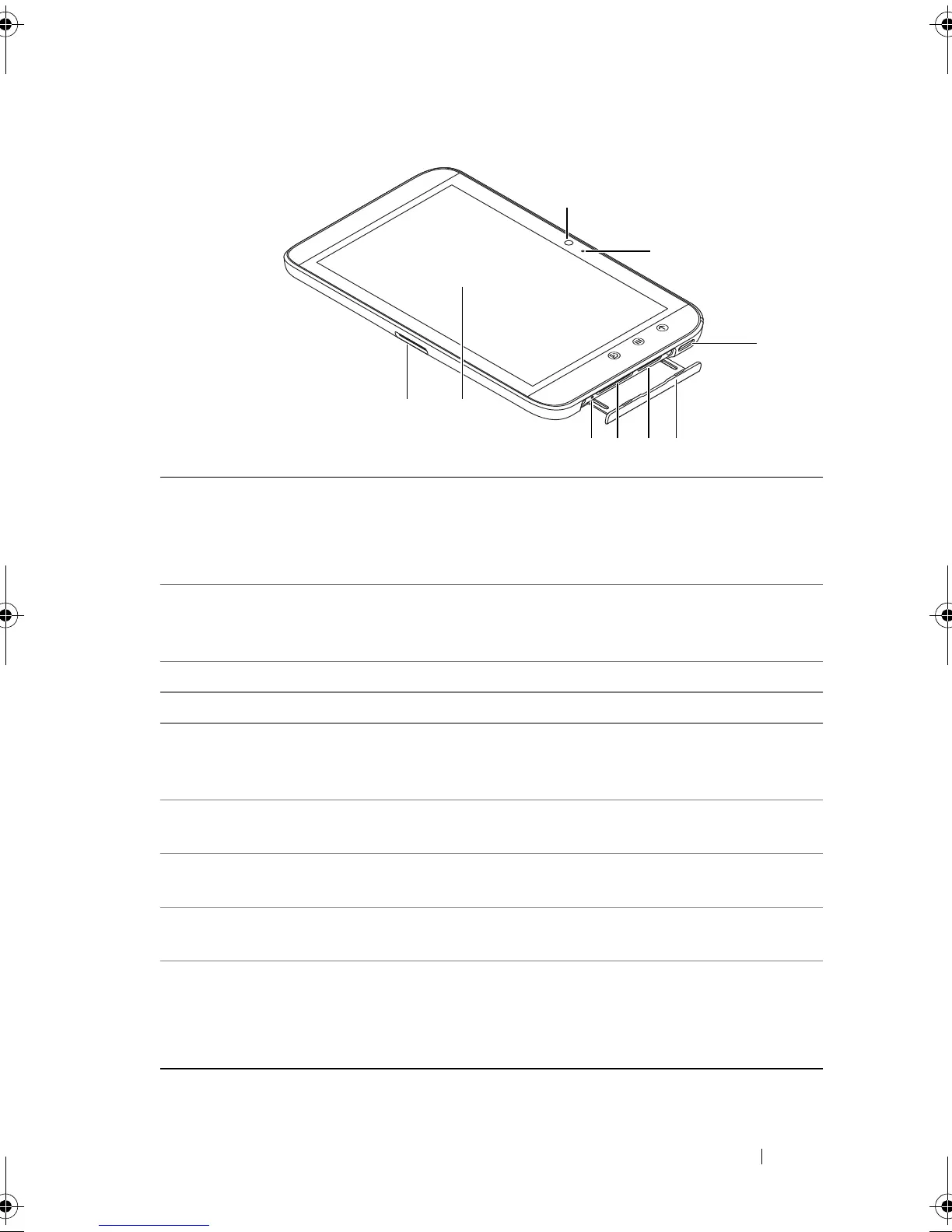
Dell Streak 7 Tablet Features 9
1 30-pin connector • Connects to the supplied USB cable for
transferring files to and from a computer.
• Connects to the supplied USB cable and USB
wall charger adapter to charge the device.
2 Touch screen Touch the screen to use on-screen controls
including buttons, menu items, and the
keyboard.
3 Force-power-off button Push the button to force power off the device.
4 SD card slot Holds the SD card in place.
5 SIM card slot
(available on select
models only)
Holds the SIM card in place.
6 Slot door Provides access to the SIM card and SD card
slots.
7 Speaker Provides audio output for video and music
playback.
8 Microphone Used for making video calls with supportive
web applications, such as Skype.
9 Front-facing camera • Used for capturing a front view picture, for
example, a self-portrait.
• Used for making video calls with supportive
web applications, such as Skype.
LG7_bk0.book Page 9 Thursday, January 27, 2011 2:16 PM



 To Next Page