Need help?
Do you have a question about the Dell U4323QE and is the answer not in the manual?
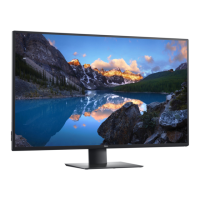
Details the monitor's capabilities including display, connectivity, and special functions.
Instructions for connecting the monitor to a computer using various cables.
Guide to setting up and using the feature to control PC power state.
Procedure to run a monitor self-test to check for proper functioning.
How to use the monitor's diagnostic tool to identify screen abnormalities.
Table of common monitor issues and their possible solutions.
Troubleshooting specific issues related to the monitor's features or connections.
Solutions for common problems encountered with USB interface and devices.
 General
| Resolution | 3840 x 2160 (4K UHD) |
|---|---|
| Panel Type | IPS |
| Refresh Rate | 60 Hz |
| Aspect Ratio | 16:9 |
| Brightness | 350 cd/m² |
| Contrast Ratio | 1000:1 |
| USB-C Power Delivery | Up to 90W |
| Built-in Devices | KVM switch |
| Color Depth | 1.07 billion colors |
| Response Time | 5 ms (gray to gray) |
| Speakers | 2 x 8W |
| Stand Adjustments | Height, Tilt, Swivel |
| VESA Mount | 100 x 100 mm |
| Viewing Angle | 178° (H) / 178° (V) |
| Ports | 1 x DisplayPort 1.4, 2 x HDMI 2.0, 1 x USB-C, 4 x USB 3.2, 1 x Audio out, 1 x RJ45 |

 To Next Page