Setting up the monitor | 41
Connecting the monitor for USB-C
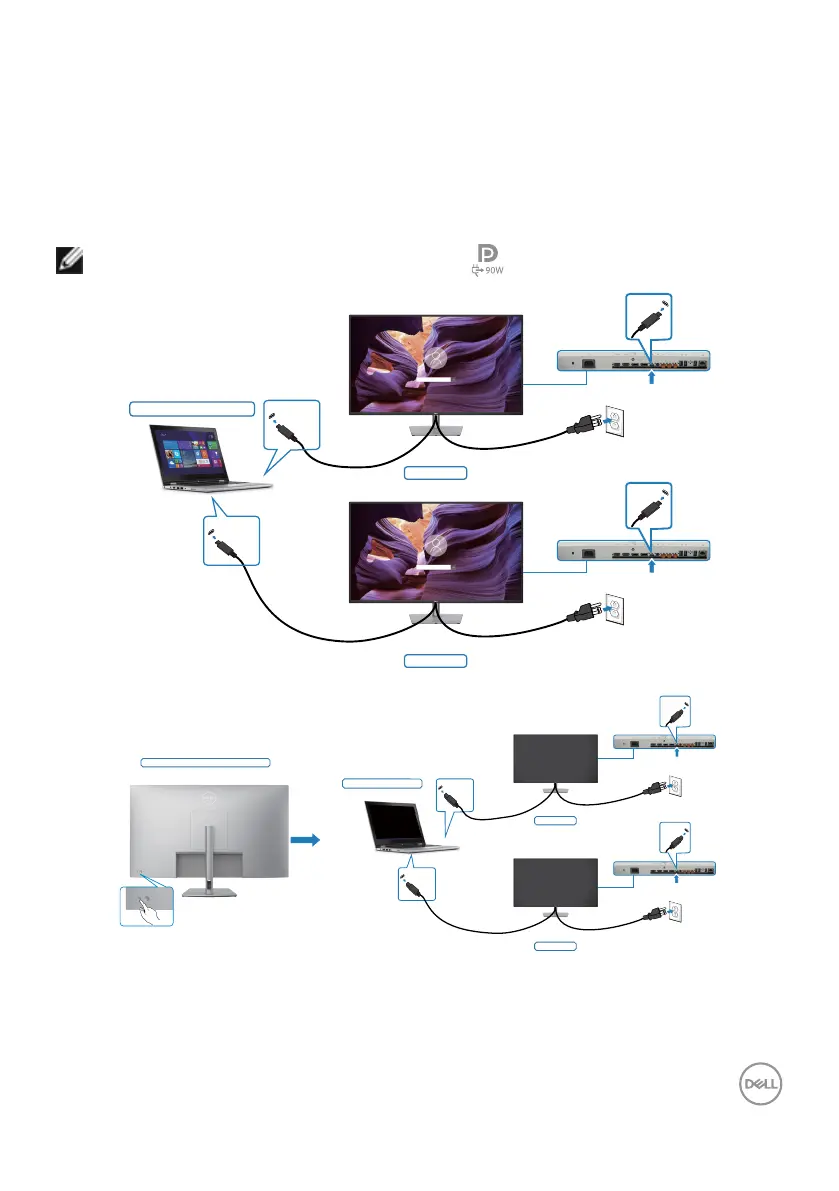
Dell PC* platform has two USB-C ports, both Monitor 1 and Monitor 2 power state
can sync with the PC.
While the PC and two monitors are in an initially ON power state, by pressing the
power button on Monitor 1 or Monitor 2 will turn OFF the PC, Monitor 1, and Monitor 2.
* Ensure to check the Dell PC for DBPS supportability.
NOTE: DPBS only supports the port with icon.
Monitor 1
System power state(ON)
USB-C
port 1
Monitor 2
USB-C
port 2
USB-C
USB-C
System power state(OFF)
Pressing power button on Monitor 1 or 2
Monitor 1
Monitor 2
USB-C
port 1
USB-C
port 2
USB-C
USB-C


 To Next Page