Operating the monitor | 47
Menu launcher details
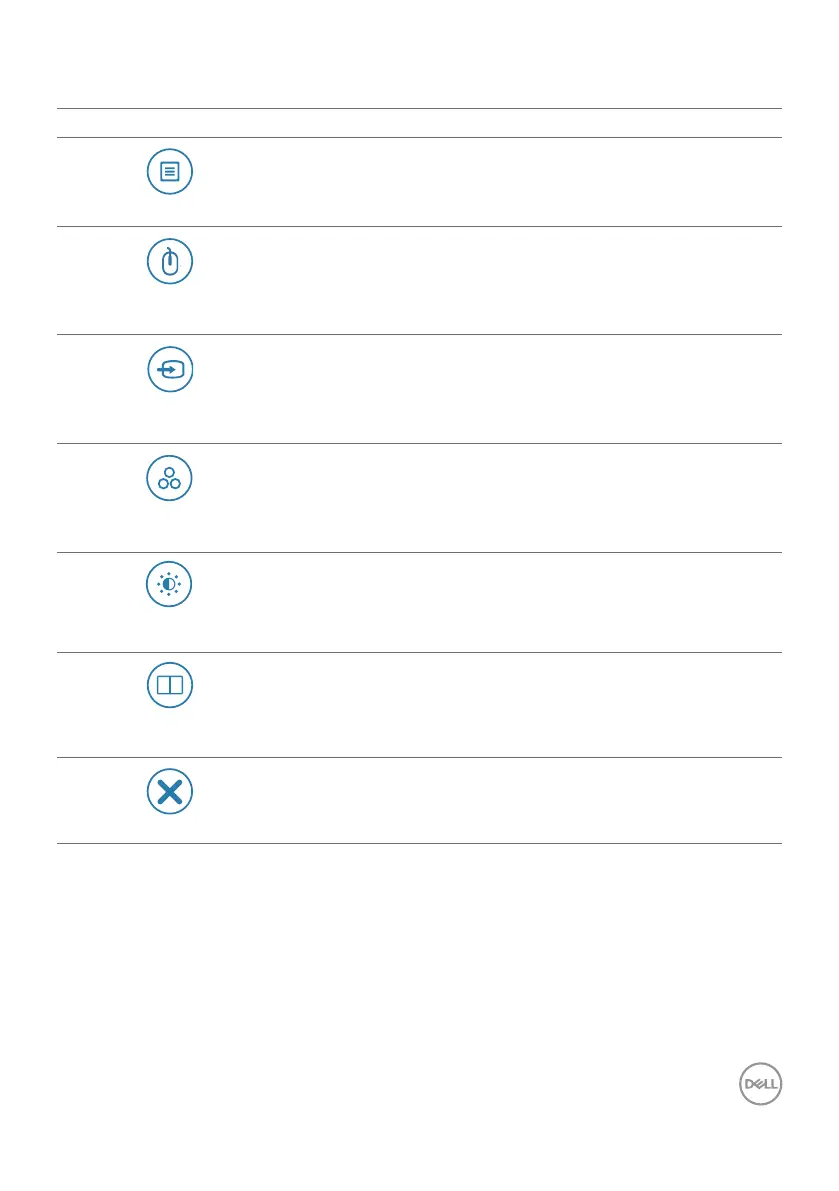
The following table describes the Menu Launcher icons:
Menu launcher icon Description
Main Menu
Opens the On-Screen Display (OSD).
For more information, see the Using the main menu
section.
USB switch
(Shortcut key 1)
Select to switch between the USB upstream sources in
PBP mode.
Input Source
(Shortcut key 2)
Sets the Input Source.
Preset Modes
(Shortcut key 3)
Allows to choose from a list of Preset colormodes.
Brightness/Contrast
(Shortcut key 4)
To directly access the Brightness/Contrast adjustment
sliders.
PIP/PBP Mode
(Shortcut key 5)
Use this button to choose from a list of PIP/PBP.
Exit
Exits from the OSD main menu.


 To Next Page