50 | Operating the monitor
Icon Menu and
Submenus
Description
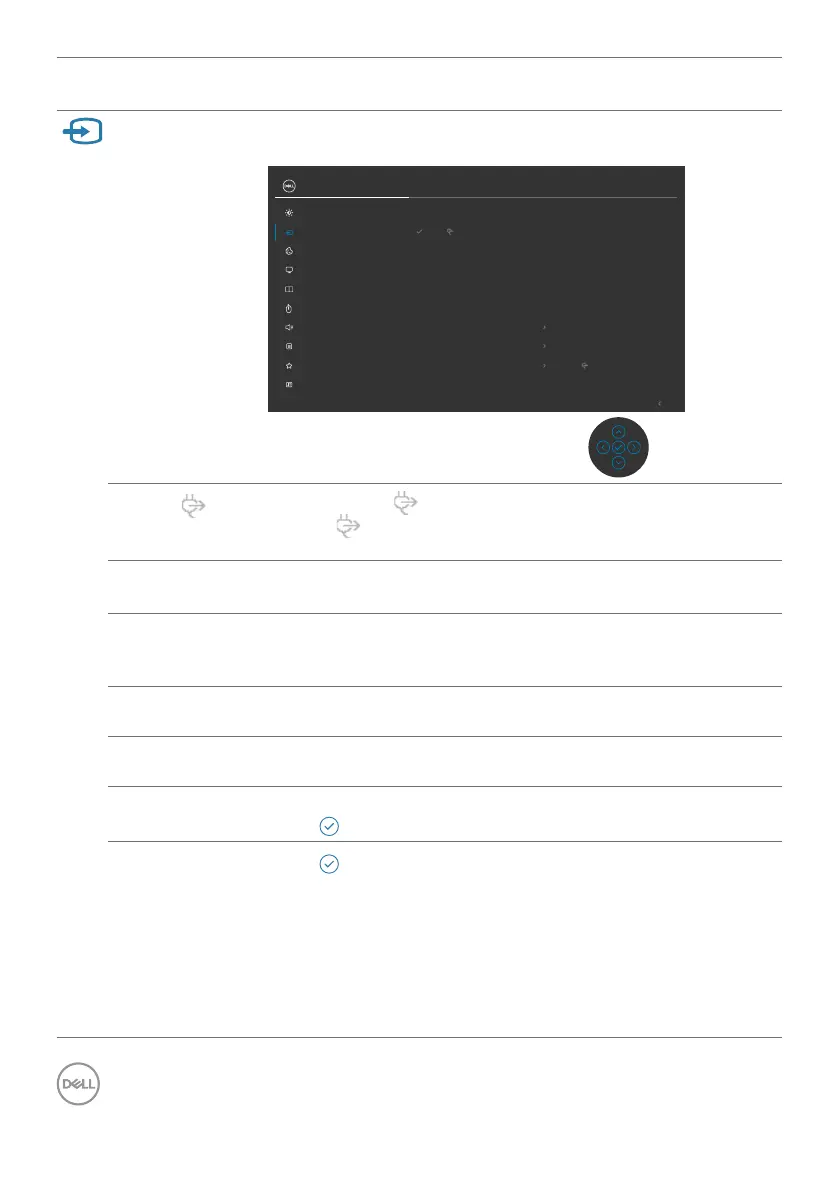
Input Source Selects between different video inputs that are connected to
your monitor.
Display
PIP/PBP
Input Source
Color
USB
Brightness/Contrast
Exit
UltraSharp 43 Monitor
Menu
Audio
Personalize
Others
DP1
DP2
HDMI 1
HDMI 2
Auto Select
Auto Select for USB-C
On
Prompt for Multiple Inputs
Rename Inputs
Reset Input Source
USB-C 90W
USB-C 90W
USB-C 90W
Select USB-C 90W input when you are using the
USB-C 90W connector. Press the joystick button to
confirm the selection.
DP 1 Select DP 1 input when you are using the DP (DisplayPort)
connector. Press the joystick button to confirm the selection.
DP 2 Select DP 2 input when you are using the DP
(DisplayPort) connector. Press the joystick button to
confirm the selection.
HDMI 1 Select the HDMI 1 input when you are using the HDMI
connector. Press the joystick button to confirm the selection.
HDMI 2 Select the HDMI 2 input when you are using the HDMI
connector. Press the joystick button to confirm the selection.
Auto Select Allows you to scan for available input sources.
Press to select this function.
Auto Select for
USB-C
Press to select these functions:
• Prompt for Multiple Inputs: always show Switch to
USB-C Video Input message for user to choose whether to
switch or not.
• Yes: The monitor always switch to USB-C video without
asking while USB-C connected.
• No: The monitor will NOT auto switch to USB-C video
from another available input.


 To Next Page