Setting Up Your TV 15
FILE LOCATION: C:\Documents and Settings\solinak\Ƈ¦±\OM update\ch2e.fm
DELL CONFIDENTIAL – PRELIMINARY 10/8/04 – FOR PROOF ONLY
www.dell.com | support.dell.com
Using the S-Video Connector
1
Turn off the TV and unplug the power cord.
NOTE: If you are connecting a device that you want to be able to remove, such as a video game system,
or a camera, use the S-Video connector on the right side of the TV (see "Right View" on page 6).
2
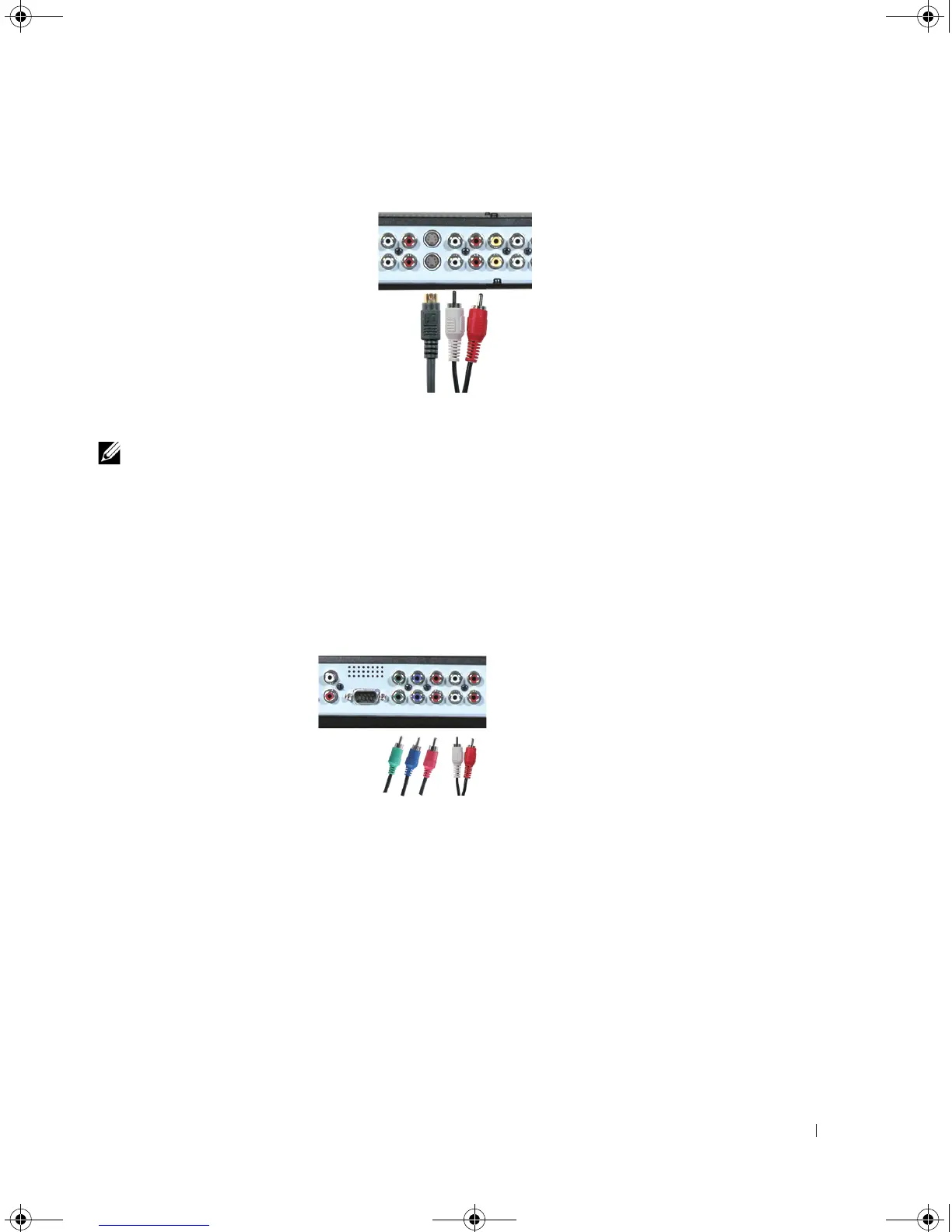
Connect your device using the S-Video and audio cables.
3
Plug in the power cords for the TV and devices and turn them on.
4
Enter the OSD and select AV3, AV4, or AV8 (side S-Video connector). See "Input Select" on
page 26 for more information.
Using the Component Connector
1
Turn off the TV and unplug the power cord.
2
Connect your device using the component video and audio cables.
3
Plug in the power cords for the TV and devices and turn them on.
4
Enter the OSD and select AV1 or AV2. See "Input Select" on page 26 for more information.
DZ101_eUM.book Page 15 Friday, October 8, 2004 2:25 PM


 To Next Page